|
Overview |
  
|
|
Overview |
|
The Ladder program is edited through a graphical editor that organizes it through the rungs. Every rung in the Ladder program corresponds to an interlock that relates input elements to output elements. Said editor is shown in the following figure.
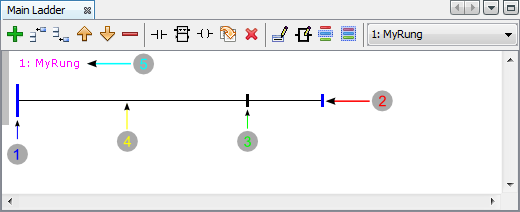
Figure 1: Rung Elements
The main elements of a rung are:
| 1. | Left busbar |
| 2. | Right busbar |
| 3. | Output busbar |
| 4. | Connection between the elements |
| 5. | Rung title and comment |
|
NOTE! Outputs will always be connected to the right of the output busbar. |
For further details on Ladder programming click here.
Through the Ladder/rungs editor tool bar, it is possible to perform the following operations:
|
- Add a new rung (end) |
|
- Add a new rung (above) |
|
- Add a new rung (below) |
|
- Move rung up |
|
- Move rung down |
|
- Remove the selected rung |
|
- Insert a contact in the rung |
|
- Insert a functional block in the rung |
|
- Insert an output coil in the rung |
|
- Change Ladder element |
|
- Delete an element in the rung (contact, functional block, or coil) |
|
- Edit rung title |
|
- Edit arguments |
|
- Select element group |
|
- Select all elements |
|
- Select the rung for edition |


