|
Editing |
  
|
|
Editing |
|
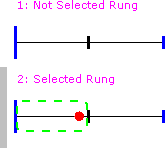
In order to edit a rung, the rung must be selected. In order to select the rung, you may click on it with the mouse or use the rung selection control in the Ladder Editor toolbar. Whenever the rung is selected, there will be a grey bar on the left side of the rung as shown in the following figure.