|
MW_Stop2 Shaft controlled stop |
  
|
|
MW_Stop2 Shaft controlled stop |
|
Block responsible for carrying out a controlled stop.
Ladder Representation
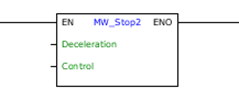
Block Structure
Variable Type |
Name |
Data Type |
Description |
VAR_INPUT |
EN |
BOOL |
Block enabling |
Deceleration |
REAL INT UINT WORD |
Stop deceleration [rpm/s] |
|
Control |
0 = Automatic 1 = Velocity 2 = Position |
Defines the type of control at the end of the stop: Automatic - Maintains current control. Velocity - Does not maintain the position after ending the stop. Position - Maintains the position after ending the stop. |
|
VAR_OUTPUT |
ENO |
BOOL |
Enabling the output |
Operation
If the EN input is "0", the block is not executed and the ENO output is zero.
If the EN input is 1, even if it is through a scan cycle, a stop is performed with a trapezoidal profile based on the characteristics programmed in the arguments.
When the stop is complete, the ENO output goes to 1 during a scan cycle, returning to 0 later.
Once started, the stop block is no longer canceled until its total stop, even if the EN input goes to 0 before the end of its stop.
If the control mode is set to Position, as long as the EN input is at 1, the position after ending the stop will be maintained.
|
NOTE! The Position control mode is only allowed when the motor control type is Encoder (P0202 = 4). |
|
NOTE! If the value of parameter P0133 (Minimum Speed) is different from zero, when executing the MW_Stop2 block, the motor speed deceleration will be performed up to the value of P0133. |
