|
MW_SRamp Generates Speed Reference with S Profile |
  
|
|
MW_SRamp Generates Speed Reference with S Profile |
|
Block that sends the speed reference with S profile.
Ladder Representation
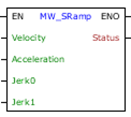
Block Structure
Variable Type |
Name |
Data Type |
Description |
VAR_INPUT |
EN |
BOOL |
Block enabling |
Velocity |
REAL INT UINT WORD |
Desired speed [rpm] |
|
Acceleration |
REAL INT UINT WORD |
Maximum acceleration of movement [rpm / s] |
|
Jerk0 |
REAL INT UINT WORD |
Initial Jerk of the Movement [rpm/s²] |
|
Jerk1 |
REAL INT UINT WORD |
Final Jerk of the Movement [rpm/s²] |
|
VAR_OUTPUT |
ENO |
BOOL |
Enabling the output |
Status |
INT UINT WORD |
Current state of the movement |
Operation
The EN input is responsible for enabling the block when there is a positive transition.
The ENO output informs you when the speed has been reached.
If the EN input is 0, the block is not executed and the ENO output is zero.
This block generates a ramp profile S, controlling the speed starting from the current speed, until reaching the desired speed. If there is a new transition at the EN entry, a new profile is executed.
If there is a transition from 0 to 1 at the EN input, if the drive is enabled, the reference is via SoftPlc, there is no other active motion block, except for another MW_SRamp block, the S Ramp speed profile is generated , and the ENO output goes to 1 when the desired speed is reached. During the trajectory, the Status is updated according to the state of execution of the movement.
This block is only finalized if a MW_Stop2 block is activated.
|
NOTE!
Values of 0 for Jerk0 or Jerk1, disable the path S profile. Negative values for acceleration and jerk are not allowed. |
Códigos e descrição do Status:
Código |
Descrição |
0 |
disabled |
1 |
motion started |
2 |
motion aborted |
10 |
running Jerk0 |
11 |
performing constant acceleration |
12 |
running Jerk1 |
20 |
Programmed deceleration greater than the maximum allowed. |
201 |
drive disabled |
202 |
motor stopped |
203 |
reference is not via SoftPLC |
204 |
failed drive |
205 |
executing another block of movement |
207 |
invalid acceleration |
208 |
Jerk0 invalid |
209 |
Jerk1 invalid |
Example in Ladder
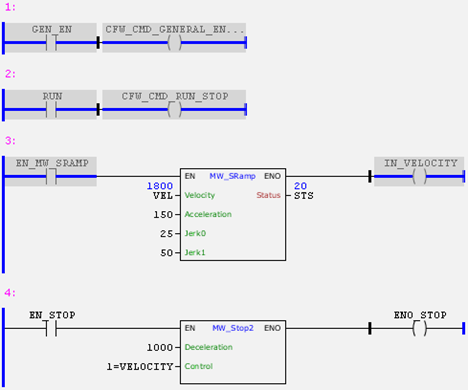
In the example above, if the drive is enabled and with the RUN command, when a positive transition occurs in EN_MW_SRAMP, the MW_SRamp block will be executed according to the values of the input arguments. Upon reaching the desired speed, the ENO output goes to 1.
In the trend graph below, it is possible to observe the Speed Reference S Profile in red and the Block Status in black. At the beginning of the movement, Status has a value of 10 and Jerk0 is executing, until it reaches maximum acceleration when it starts executing the movement with constant acceleration and Status has a value of 11. At the end of Profile S, the block executes Jerk1 and the Status has a value of 12 until reaching the desired speed. When the desired speed is reached, the Status has a value of 20 and it is at that moment that the ENO output goes to 1.
In the graph it is possible to verify that after a few moments the motor reaches the desired speed of 1800 rpm, the block is enabled again and a new S Profile is executed until reaching the new desired speed of zero rpm.
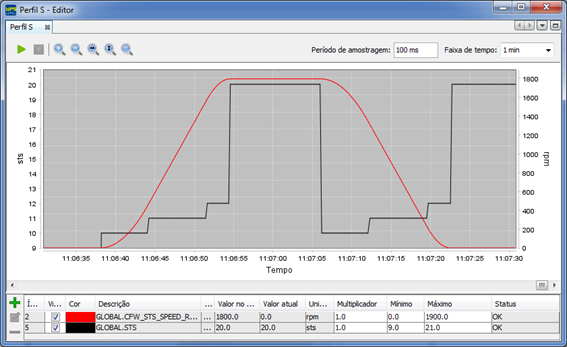
To stop the motor, the MW_Stop2 block must be enabled or execute the MW_SRamp block with the Velocity input argument with the value zero.
Example in ST
The example below displays the instructions for applying the example above in the ST language.
VAR GEN_EN, RUN, EN_MW_SRAMP : BOOL := TRUE; IN_VELOCITY, EN_STOP, ENO_STOP : BOOL; VEL, STS : WORD; END_VAR
CFW_CMD_GENERAL_ENABLE := GEN_EN; CFW_CMD_RUN_STOP := RUN; FB_MW_SRamp( Execute:=EN_MW_SRAMP, Velocity:=VEL, Acceleration:=150, Jerk0:=25, Jerk1:=50, Status=>STS, Done=>IN_VELOCITY);
FB_MW_Stop2( Execute:=EN_STOP, Deceleration:=1000, Control:=1, Done=>ENO_STOP);
|
|---|
