|
MW_RefVelocity Generate Reference of Velocity |
  
|
|
MW_RefVelocity Generate Reference of Velocity |
|
This block sends speed reference to drive.
Ladder Representation
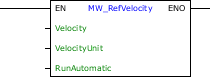
Block Structure
Variable Type |
Name |
Data Type |
Description |
||||
VAR_INPUT |
EN |
BOOL |
Block enabling |
||||
Velocity |
DINT INT REAL |
Sets speed reference to drive if block is enabled |
|||||
VelocityUnit |
0 = 13Bits 1 = RPM 2 = HZ(x10) |
Sets the speed unit: 13 Bits – Sends the speed value in 13 bits; RPM – Sends the speed value in RPM; HZ – Sends the speed value in Hz (x10). |
|||||
RunAutomatic |
0 = FALSE 1 = TRUE |
Define if block will run the Run/Stop (CFW_CMD_RUN_STOP) when it is enabled: FALSE – Do not send Run/Stop command with block enabling (it is necessary to use the marker CFW_CMD_RUN_STOP in ladder's logic to send the Run/Stop command); TRUE – Send Run command with block enabling and Stop command with block disabling. |
|||||
VAR_OUTPUT |
ENO |
BOOL |
End of operation. Conditions for ENO = 1
|
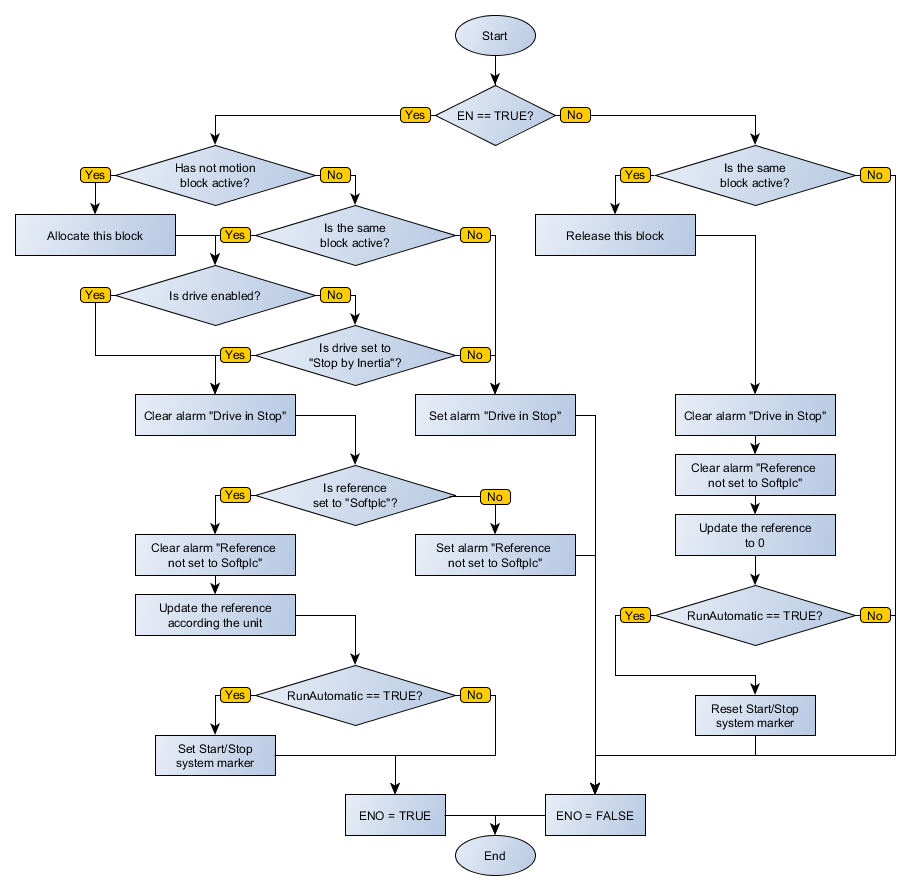
Operation
When this block has a "0" value in EN, it does not execute and ENO output is zero.
RunAutomatic = TRUE
When this block has a "1" value in EN input, the drive is general enabled, no other motion block is active, the Run/Stop command goes to "1", the speed reference value is send to drive and the ENO output is set to "1".
If EN input has a "0" value, and this block is active, the Run/Stop command is set to "0" and ENO output goes to "0".
RunAutomatic = FALSE
When this block has a "1" value in EN input, the drive is general enabled, the Run/Stop command is set to "1", no other motion block is active, the speed reference value is send to drive and the ENO output is set to "1".
If EN input has a "0" value and this block is active, ENO output is set to "0".
|
NOTE! Check the source of speed reference and command Run/Stop for correct operation of this block |
Block Flowchart
Example in Ladder


The above example shows the MW_RefVelocity block, set to Hz and the RunAutomatic command in TRUE, if drive is general enabled and the block is enabled, the speed reference is changed.


The above example shows the MW_RefVelocity block, set to Hz and RunAutomatic command in FALSE, if drive is general enabled, it is necessary the Run command. So, when the block be enabled, the speed reference would be changed.
Example in ST
The example below displays the instructions for applying the example above in the ST language.
VAR ENABLE_BLOCK : BOOL; SPEED : INT; END_VAR
FB_MW_RefVelocity( EN:=ENABLE_BLOCK, Velocity:=SPEED, VelocityUnit:=2, RunAutomatic:=0);
|
|---|
