|
With the Mouse |
  
|
|
With the Mouse |
|
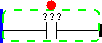
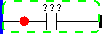
All browsing functionalities with the keyboard in the rung are also available in the mouse. It is possible to select an element and the respective insertion point directly with the click of the mouse.
Cursor |
Action |
Representation |
|---|---|---|
|
Selects element and upper insertion point |
|
|
Selects element and lower insertion point |
|
|
Selects element and anterior insertion point |
|
|
Selects element and posterior insertion point |
|
During the element insertion operation with the mouse, by dragging and releasing the mouse in the palette, as we drag the elements over the rung, the selection and the insertion point follow the mouse cursor so as to determine the insertion point. The following figure exemplifies the insertion of elements via mouse.
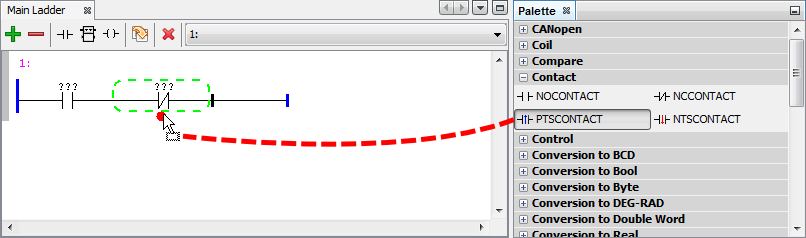
Figure 1: Operation of dragging component with the Mouse
Element insertion sequence via mouse:
| 1. | Select the palette element you wish to insert by clicking on it with the mouse, and keeping the mouse button pressed |
| 2. | Drag this element over the rung |
| 3. | Select the insertion point and release the mouse button on it |
The insertion result in this example will be as follows.
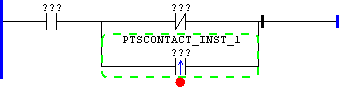
Figure 2: Result after the dragging operation
During the insertion via mouse, it is also possible to select the group of elements. For that purpose, as the previously selected element is dragged, press the Ctrl function key and keep it pressed; while the Ctrl key is being pressed, the mouse will select insertion points related to groups.