|
Establishing Communication - Ethernet |
  
|
|
Establishing Communication - Ethernet |
|
Refer to the equipment manual before performing communication via Ethernet.
For communication it will be needed a network cable with standard RJ45 connectors.
Depending on the equipment, it will be necessary to attach an accessory to allow communication through this protocol.
Communication Configuration on the WPS
On the WPS, select the Ethernet port in the window Property > Communication Configuration as follows.
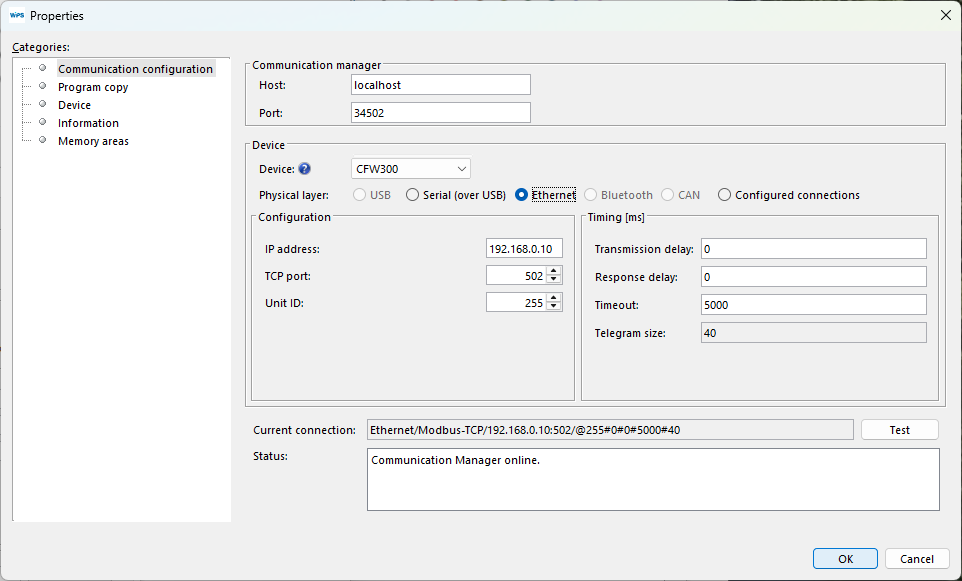
Fill in the IP address, TCP port and unit ID fields with the values that were parameterized in the equipment.
It is possible to use the Test button to make sure that the equipment will communicate with WPS using this configuration.
Click OK to apply this configuration in WPS.
|
NOTE! Turn off the device before connecting accessories or before connecting wires, then re-power the device before testing communication. |
