|
MC_CamTableSelect Cam Table Selection |
  
|
|
MC_CamTableSelect Cam Table Selection |
|
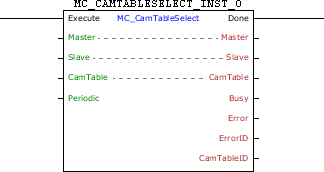
Block that selects a cam table of a CAM curve previously programmed through the tool CAM Profiles.
Ladder Representation
Execution Features
Program Memory Size |
44 Bytes |
Data Memory Size |
16 Bytes |
Block Structure
Variable Type |
Name |
Data Type |
Description |
VAR_IN_OUT |
Master |
BYTE |
Selection of operation master (0 - Fast digital inputs) (1 - CANopen) (2 - Encoder 1) (3 - Virtual Axis) (4 - Encoder 2) |
Slave |
BYTE |
Selection of operation slave (0 - Real axis) (1 - Virtual 1 axis) |
|
CamTable |
WORD |
CAM table code |
|
VAR_INPUT |
Execute |
BOOL |
Block enabling |
Periodic |
BOOL |
Control of the request execution (0 - Single execution) (1 - Periodic execution) |
|
VAR_OUTPUT |
Done |
BOOL |
Output enabling |
Busy |
BOOL |
Flag indicating the block has not yet been ended |
|
Error |
BOOL |
Error in the execution flag |
|
ErrorID |
WORD |
Identifier of the occurred error |
|
CamTableID |
WORD |
Selected CAM table |
|
VAR |
MC_CAMTABLESELECT_INST_0 |
MC_CAMTABLESELECT |
Instance of access to block structure |
Operation
When this block detects a leading edge in Execute, it searches the specified table in CamTable so that it can be used by the MC_CamIn block.
When Execute has FALSE value, Done remains FALSE. The Done output is activated when the block finishes the execution successfully, remaining at TRUE level until Execute receives FALSE.
If there is any error in the execution, the Error output is enabled and ErrorID displays an error code according to the table below.
Code |
Description |
83 |
Invalid file of the CAM curve cam table. |
84 |
Invalid Cam Table. Cam Table must be from 1 to 10. |
Example in Ladder
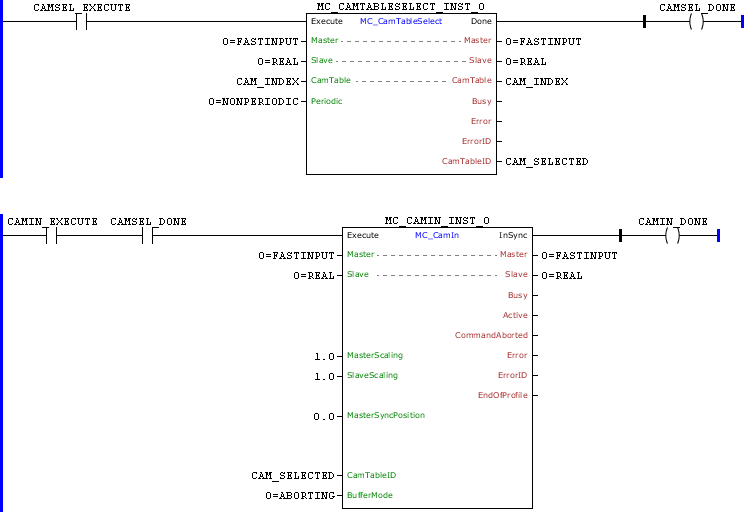
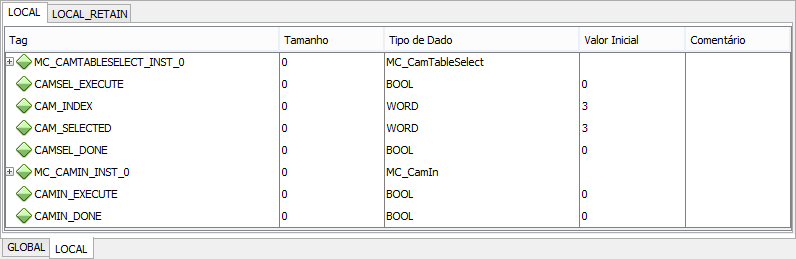
In the up transition of CAMSEL_EXECUTE the MC_CamTableSelect block is executed and, thus, the cam table selected in CAM_INDEX can be used by the MC_CamIn block.
To execute the block, the Done output and CAMSEL_DONE are set and remain at TRUE level while the Execute input is set.
In this example, CAMSEL_DONE ensures that the MC_CamIn block will not be activated before the MC_CamTableSelect block is executed successfully.
Example in ST
The example below displays the instructions for applying the example above in the ST language.
VAR CAMSEL_EXECUTE, CAMSEL_DONE, CAMIN1_EXECUTE, CAMIN1_DONE : BOOL; CAM_INDEX, CAM_SELECTED : WORD; MC_CAMTABLESELECT_INST_0 : FB_MC_CamTableSelect; MC_CAMIN_INST_0 : FB_MC_CamIn; END_VAR
MC_CAMTABLESELECT_INST_0.Execute := CAMSEL_EXECUTE; MC_CAMTABLESELECT_INST_0( Master:=0, Slave:=0, CamTable:=CAM_INDEX, Periodic:=0); CAM_SELECTED := MC_CAMTABLESELECT_INST_0.CamTableID; CAMSEL_DONE := MC_CAMTABLESELECT_INST_0.Done;
MC_CAMIN_INST_0.Execute := CAMIN1_EXECUTE AND CAMSEL_DONE; MC_CAMIN_INST_0( Master:=0, Slave:=0, MasterScaling:=1.0, SlaveScaling:=1.0, MasterSyncPosition:=LREAL#0.0, CamTableID:=CAM_SELECTED, BufferMode:=0); CAMIN1_DONE := MC_CAMIN_INST_0.InSync;
|
|---|