|
MC_CamOut End of CAM Synchronism |
  
|
|
MC_CamOut End of CAM Synchronism |
|
Block responsible for the completion of a synchronization established by a block MC_CamIn.
Ladder Representation
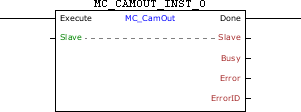
Execution Features
Program Memory Size |
28 Bytes |
Data Memory Size |
4 Bytes |
Block Structure
Variable Type |
Name |
Data Type |
Description |
VAR_IN_OUT |
Slave |
BYTE |
Selection of operation slave (0 - Real axis) (1 - Virtual 1 axis) |
VAR_INPUT |
Execute |
BOOL |
Block enabling |
CamTableID |
WORD |
Selected CAM table |
|
BufferMode |
BYTE |
Execution start mode (0 - Starts block immediately, if there is another block in the execution it will be aborted) (1 - When another block is in execution, the block in execution will continue its motion until the end and this new block will wait to be executed.) (6 – If another block is in execution, this block will go into error 52 and will not be executed. The HMI will show the alarm A00052.) |
|
VAR_OUTPUT |
Done |
BOOL |
Output enabling |
Busy |
BOOL |
Flag indicating the block has not yet been ended |
|
Error |
BOOL |
Error in the execution flag |
|
ErrorID |
WORD |
Identifier of the occurred error |
|
VAR |
MC_CAMOUT_INST_0 |
MC_CAMOUT |
Instance of access to block structure |
Operation
When this block detects a leading edge in Execute it concludes the existing synchronism for the last execution of a block MC_CamIn. The axis will keep the speed of the moment in which the block is executed.
When Execute has FALSE value, Done remains FALSE. The Done output is activated when the block finishes the execution successfully, remaining at TRUE level until Execute receives FALSE.
If there is any error in the execution, the Error output is enabled and ErrorID displays an error code according to the table below.
Code |
Description |
67 |
Drive in the "Disabled" or "Errorstop" status. |
71 |
P202 different from 4. |
73 |
Drive is not in the "Synchronized Motion" status |
78 |
MC block not executed – Internal fault. |
Example in Ladder

In the up transition of CAMOUT_EXECUTE, the MC_CamOut block is executed. With this, the Busy and Active signals of this block are set and synchronism started by other CAM blocks ends. When the process finishes, the Done output of the block is set and remains TRUE while the Execute input is set.
Example in ST
The example below displays the instructions for applying the example above in the ST language.
VAR CAMOUT_EXECUTE, DONE : BOOL; MC_CAMOUT_INST_0 : FB_MC_CamOut; END_VAR
MC_CAMOUT_INST_0.Execute := CAMOUT_EXECUTE; MC_CAMOUT_INST_0(Slave:=0); DONE := MC_CAMOUT_INST_0.Done;
|
|---|