|
LOWPASS |
  
|
|
LOWPASS |
|
Block that filters the input using a low pass filter of first order and inserts the result in the output.
Ladder Representation
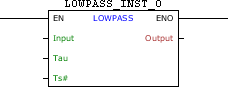
Block Structure
Variable Type |
Name |
Data Type |
Description |
VAR_INPUT |
EN |
BOOL |
Block enabling |
Input |
REAL |
Input signal |
|
Tau |
REAL |
Filter time constant |
|
Ts# |
UINT |
Sampling time [ms] |
|
VAR_OUTPUT |
ENO |
BOOL |
Output enabling |
Output |
REAL |
Filter output |
|
VAR |
LOWPASS_INST_0 |
LOWPASS |
Instance of access to block structure |
Operation
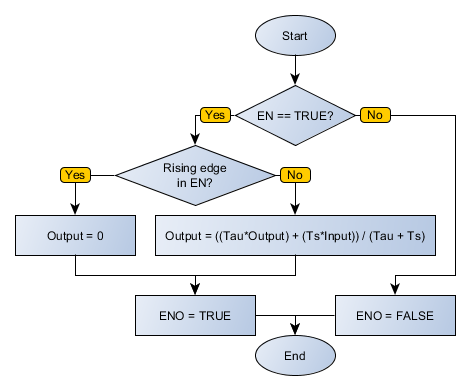
When this block has a TRUE value in EN, filters the input value of Input using a low pass first order filter described by Tau and Ts#, inserting the result in Output. On the leading edge of EN, Output receives zero.
When EN has FALSE value, Output remains unchanged.
The ENO value forwards to the next Ladder block the EN value after the operation is completed.
Block Flowchart
Example in Ladder

The above example causes OUTPUT, by identifying a leading edge in EN, to display a behavior of first order with time constant equal to Tau and the sampling time of 2 ms, in order to achieve the reference set to INPUT. At each calculation completed successfully, the ENO output is activated.
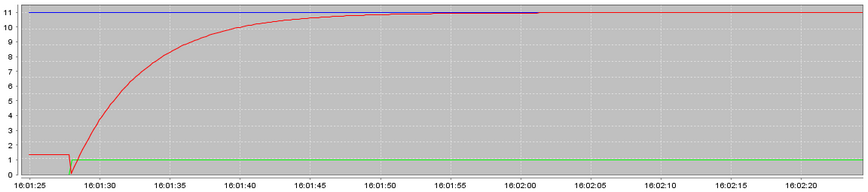
Example in ST
The example below displays the instructions for applying the example above in the ST language.
VAR INPUT : REAL := 10.98; TAU : REAL := 5.0; OUTPUT : REAL; LOWPASS_INST_0 : FB_LOWPASS; END_VAR
LOWPASS_INST_0.EN := DI1; LOWPASS_INST_0(Input:=INPUT, Tau:=TAU, Ts:=2); OUTPUT := LOWPASS_INST_0.Output; DO1 := LOWPASS_INST_0.ENO;
|
|---|