|
IMMEDIATEINPUT |
  
|
|
IMMEDIATEINPUT |
|
Block that performs an instantaneous reading of the selected input value, without changing the value of images (GLOBAL_IO variables).
Ladder Representation

Block Structure
Variable Type |
Name |
Data Type |
Description |
VAR_INPUT |
EN |
BOOL |
Block enabling |
Source# |
BYTE |
Inputs to be read (digital or analog) |
|
VAR_OUTPUT |
ENO |
BOOL |
Output enabling |
Destination |
WORD INT UINT |
Variable mapped with the values of the inputs selected |
Operation
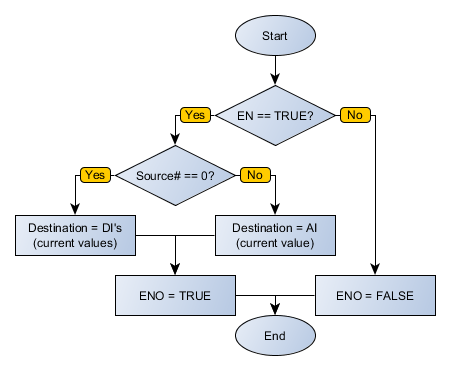
When this block has a TRUE value in EN, it gets the immediate value of the selected input in Source#. If selected the analog input AI1, its value is passed on to Destination. If the digital input is selected, its bits are concatenated so that DI1 be the least significant bit and DI10 be the most significant bit and the result is sent to Destination.
When EN has FALSE value, Destination remains unchanged.
The ENO value forwards to the next Ladder block the EN value after the operation is completed.
Compatibility
Device |
Version |
PLC300 |
1.20 or higher |
SCA06 |
2.00 or higher |
Block Flowchart
Example in Ladder
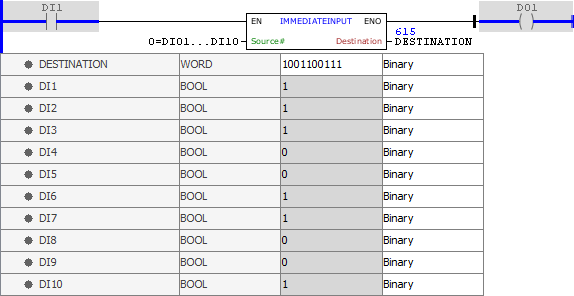
The example above is an immediate reading of the signs of the digital inputs DI1 to DI10 of the PLC300. This reading is then interpreted as a binary sequence with DI1 being the least significant bit and the result is sent to the DESTINATION variable. The block ends with success, ENO output is activated.
Example in ST
The example below displays the instructions for applying the example above in the ST language.
VAR DESTINATION : WORD; END_VAR
DESTINATION := FB_IMMEDIATEINPUT(EN:=DI1, Source:=0, ENO=>DO1);
|
|---|