|
CALL Functional Block to call ladder files |
  
|
|
CALL Functional Block to call ladder files |
|
Block that loads a file and do a ladder call.
Ladder Representation

Block Structure
Variable Type |
Name |
Data type |
Description |
VAR_INPUT |
EN |
BOOL |
Block enabling |
FILENAME# |
STRING |
Ladder file name (POU) enclosed in gingle quotation marks |
|
VAR_OUTPUT |
ENO |
BOOL |
End of operation |
VAR |
CALL_INST_0 |
CALL |
Instance of access to block structure |
Operation
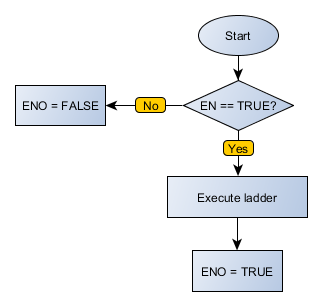
When this block has a TRUE value in EN, it updates the values of internal fields with the input variables, performs the Ladder routine loading the file and updates the values of the outputs after completing routine.
When EN has FALSE value, outputs remain unchanged.
The ENO value forwards to the next Ladder block the EN value after the operation is completed.
Compatibility
Device |
Version |
PLC300 |
4.03 or higher |
Block Flowchart
Example in Ladder
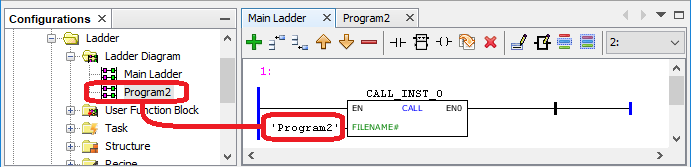
In the example below, the POU 'Program2' will be executed through the 'Main Ladder'.
Example in ST
The example below displays the instructions for applying the example above in the ST language.
VAR CALL_INST_0 : FB_CALL; END_VAR
CALL_INST_0(FILENAME:='Program2');
|
|---|