|
MW_PlcMoveRelative2 |
  
|
|
MW_PlcMoveRelative2 |
|
Block for controlling the relative position of two stepper motors simultaneously.
Ladder Representation
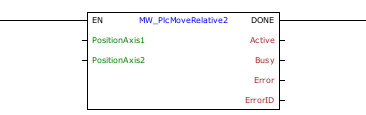
Block Structure
Variable Type |
Name |
Data Type |
Description |
VAR_INPUT |
EN/Execute |
BOOL |
Block enabling |
PositionAxis1 |
DINT |
Desired position of axis 1 |
|
PositionAxis2 |
DINT |
Desired position of axis 2 |
|
VAR_OUTPUT |
DONE |
BOOL |
Output enabling |
Active |
BOOL |
Indicates that the block is active |
|
Busy |
BOOL |
Indicates that another block is using the selected output |
|
Error |
BOOL |
Indicates that an error occurred when calling the block |
|
ErrorID |
BYTE |
Indicates the error generated |
|
VAR |
MW_PlcMoveRelative2_INST_0 |
MW_PlcMoveRelative2 |
Instance of access to block structure |
Operation
When the EN input changes from FALSE to TRUE, the block starts generating the number of pulses for the stepper motors on both axes, considering the signal to reverse the direction of rotation.
The PLC has a standard final frequency and maximum acceleration ramp for axis control, which can be changed using the MW_PlcChangeRamp1 block. The default ramp values are:
| • | Acceleration/deceleration time: 100ms; |
| • | Number of steps for acceleration: 20; |
| • | Starting frequency: 0 Hz; |
| • | Final frequency: 10 kHz. |
These values change dynamically to ensure that both axes are synchronized and that the path between the current position and the desired position is a straight line.
|
NOTE! There must be enough pulses for the ramp to be generated, otherwise the pulses will be generated without a ramp. |
The desired position is always relative to the current position, that is, if the current position is 10000 and "position" is 5000, the final position will be 15000.
If the desired relative position is negative, the axis direction signal will be reversed and the number of pulses will be generated normally.
|
NOTE! You can reverse the default direction using the product parameters. Look at the parameter manual. |
As long as the desired position is not reached, the "Active" output goes to TRUE.
When the desired position is reached, the DONE output goes to TRUE and the "Active" bit changes to FALSE.
To stop the pulse generation during movement, use the MW_PlcStop2 block. In this case, the block considers the movement to be completed.
The minimum number of steps that can be generated is two.
If this limitation is not respected, no pulse is generated and the block returns an error.
If there is any error in the execution, the Error output is enabled and ErrorID displays an error code according to the table below.
Code |
Description |
0 |
Executed successfully |
1 |
Axis control not enabled |
2 |
Invalid number of steps |
3 |
Unable to generate a synchronized path |
4 |
Invalid ramp |
5 |
Configuration error |
|
NOTE! Stepper motor control must be enabled for the selected axis. Look at the user manual and parameter manual. |
Example in Ladder
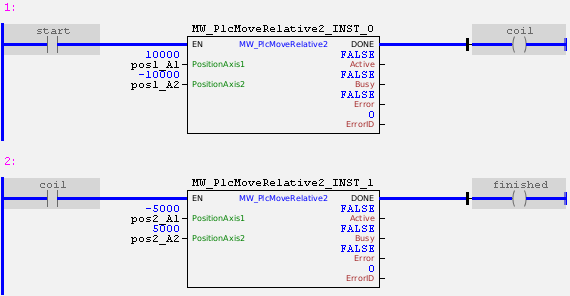
In the example above, both axes are controlled as follows:
When the "start" contact is activated, a PWM signal is generated at the pulse output of axis 1 with an initial frequency of 0 Hz and duty cycle of 50%. The direction output of axis 1 is set to low level (considering that the direction was not reversed via parameters), and a synchronized ramp is made with axis 2 until 10000 are generated.
In parallel, a PWM signal is generated at the pulse output of axis 2 with an initial frequency of 0 Hz and a duty cycle of 50%. The direction output of axis 2 is set to high level (considering that the direction has not been reversed via parameters), and a synchronized ramp is made with axis 1 until 10000 pulses are generated with the opposite direction signal.
The two axes end their path at the same instant. At this moment, the DONE output is activated, and the second block is enabled.
When enabling the second block, the direction output of axis 1 is automatically reversed, and 5000 pulses are generated at the pulse output. At the end, the axis will be in position 5000.
In parallel, the direction output of axis 2 is also reversed (as pulses will now be generated in the positive direction), and other 5000 pulses are generated. At the end, the axis will be in position -5000.
Example in ST
The example below displays instructions for applying the functional example in ST language.
VAR pos1_A1 : DINT := 10000; pos1_A2 : DINT := -10000; pos2_A1 : DINT := -5000; pos2_A2 : DINT := 5000; start : BOOL := 0 ; coil : BOOL; finished : BOOL; MW_PlcMoveRelative2_INST_0 : FB_MW_PlcMoveRelative2; MW_PlcMoveRelative2_INST_1 : FB_MW_PlcMoveRelative2; END_VAR
MW_PlcMoveRelative2_INST_0.EN := start; MW_PlcMoveRelative2_INST_0( PositionAxis1:=pos1_A1, PositionAxis2:=pos1_A2); coil := MW_PlcMoveRelative2_INST_0.DONE;
MW_PlcMoveRelative2_INST_1.EN := coil; MW_PlcMoveRelative2_INST_1( PositionAxis1:=pos2_A1, PositionAxis2:=pos2_A2); finished := MW_PlcMoveRelative2_INST_1.DONE;
|
|---|
