|
MW_PlcSetPosition1 |
  
|
|
MW_PlcSetPosition1 |
|
Block to configure the current position of the axis.
Ladder Representation

Block Structure
Variable Type |
Name |
Data Type |
Description |
VAR_INPUT |
EN |
BOOL |
Block enabling |
AxisNumber |
CONST |
Selected axis |
|
Position |
DINT |
Desired position |
|
VAR_OUTPUT |
ENO |
BOOL |
Output enabling |
VAR |
MW_PlcSetPosition1_INST_0 |
MW_PlcSetPosition1 |
Instance of access to block structure |
Operation
When the EN input changes from FALSE to TRUE (rising edge), the block configures the current position of the axis according to the "position" value.
|
NOTE! Stepper motor control must be enabled for the selected axis. Look at the user manual and parameter manual. |
Example in Ladder
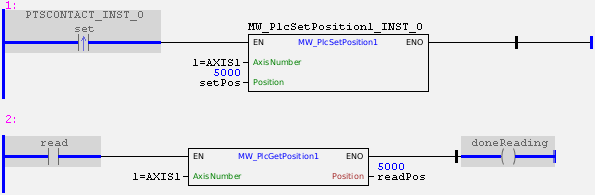
In the example above, the "set" contact changes the current position of axis 1 to 5000.
The "read" contact enables reading the current position of axis 1, allowing the monitoring of the change made.
Example in ST
The example below displays instructions for applying the example above in ST language.
VAR set : BOOL := 1; read : BOOL := 1; doneReading : BOOL; setPos : DINT := 5000; readPos : DINT := 0 ; PTSCONTACT_INST_0 : FB_PTSCONTACT; MW_PlcSetPosition1_INST_0 : FB_MW_PlcSetPosition1; END_VAR
PTSCONTACT_INST_0(EN:=TRUE, BIT:=set);
MW_PlcSetPosition1_INST_0( EN:=PTSCONTACT_INST_0.Q, AxisNumber:=1, Position:=setPos);
doneReading := FB_MW_PlcGetPosition1( EN:=read, AxisNumber:=1, Position=>readPos);
|
|---|
