|
MBTCP_ServerStatus Monitoração de Servidor de rede Modbus TCP |
  
|
|
MBTCP_ServerStatus Monitoração de Servidor de rede Modbus TCP |
|
Block that allows monitoring the status of 4 servers of the Modbus TCP network.
Ladder Representation
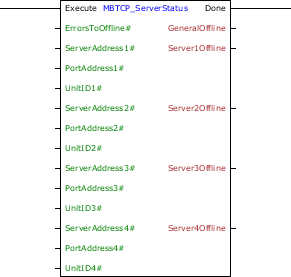
Block Structure
Variable Type |
Name |
Data Type |
Description |
VAR_INPUT |
Execute |
BOOL |
Block enabling |
ErrorsToSetOffline# |
BYTE |
Amount of errors that the must be identified until it considers communication with an offline server |
|
ServerAddress1# |
DWORD |
Server 1 address to be monitored (Ex: 192.168.0.1) |
|
PortAddress1# |
WORD |
Server 1 port to be monitored (Standard: 502) |
|
UnitID1# |
BYTE |
Server 1 UnitID to be monitored (Standard: 255) |
|
ServerAddress2# |
DWORD |
Server 2 address to be monitored (Ex: 192.168.0.1) |
|
PortAddress2# |
WORD |
Server 2 port to be monitored (Standard: 502) |
|
UnitID2# |
BYTE |
Server 2 UnitID to be monitored (Standard: 255) |
|
ServerAddress3# |
DWORD |
Server 3 address to be monitored (Ex: 192.168.0.1) |
|
PortAddress3# |
WORD |
Server 3 port to be monitored (Standard: 502) |
|
UnitID3# |
BYTE |
Server 3 UnitID to be monitored (Standard: 255) |
|
ServerAddress4# |
DWORD |
Server 4 address to be monitored (Ex: 192.168.0.1) |
|
PortAddress4# |
WORD |
Server 4 port to be monitored (Standard: 502) |
|
UnitID4# |
BYTE |
Server 4 UnitID to be monitored (Standard: 255) |
|
VAR_OUTPUT |
Done |
BOOL |
Output enabling |
GeneralOffline |
BOOL |
Flag indicating any one of the monitored communication is offline |
|
Server1Offline |
BOOL |
Flag of offline status for server 1 |
|
Server2Offline |
BOOL |
Flag of offline status for server 2 |
|
Server3Offline |
BOOL |
Flag of offline status for server 3 |
|
Server4Offline |
BOOL |
Flag of offline status for server 4 |
Operation
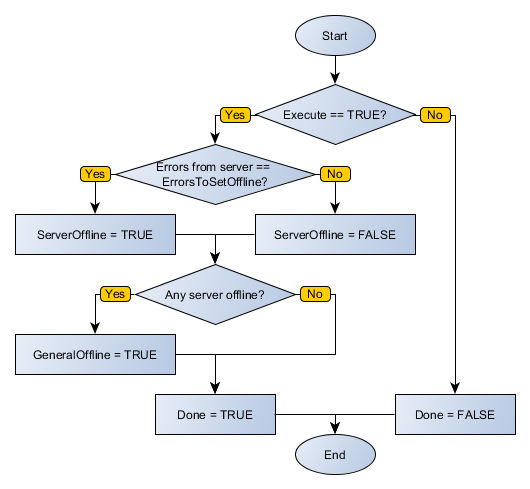
This block remains active while Execute is at TRUE level, updating its outputs according to the monitoring of the number of errors recorded for each server. When Execute receives FALSE level, the inputs are ignored and the outputs are zeroed. The Done output receives TRUE level when Execute has TRUE level and block finished its execution.
The ErrorsToSetOffline # input allows registering the number of errors identified in a server that will feature an offline communication. AddressServer inputs allow inserting four server addresses to be monitored. If you want to leave a channel ignored, enter the value 0 in the server address. When this monitored server reports the programmed number of errors, its corresponding SlaveOffline output is set to TRUE level. If any of SlaveOffline outputs is at TRUE level, GeneralOffline also receives TRUE level.
Compatibility
Device |
Version |
PLC300 |
1.30 or higher |
Block Flowchart
Example in Ladder
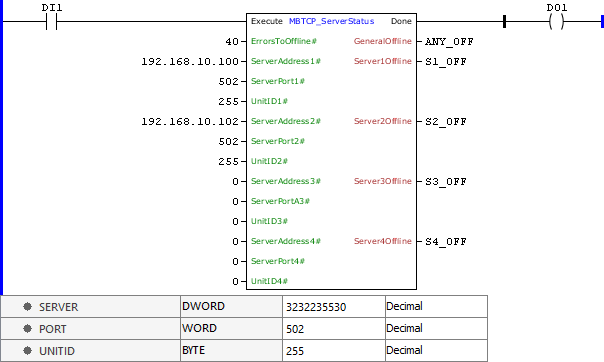
The above example checks the number of error responses sent by the servers 192.168.10.100:502 and 192.168.10.102:502 of the Modbus TCP network. If any of them is greater than 40, its SX_OFF status is led to TRUE level. The block ends successfully, Done output is activated.
Example in ST
The example below displays the instructions for applying the example above in the ST language.
VAR ANY_OFFLINE, S1_OFF, S2_OFF, S3_OFF, S4_OFF: BOOL; END_VAR
DO1 := FB_MBTCP_ServerStatus( Execute:=DI1, ErrorsToSetOffline:=40, ServerAddress1:=16#C0A80A64, ServerPort1:=502, UnitID1:=255, ServerAddress2:=16#C0A80A66, ServerPort2:=502, UnitID2:=255, ServerAddress3:=0, ServerPort3:=0, UnitID3:=0, ServerAddress4:=0, ServerPort4:=0, UnitID4:=0, GeneralOffline=>ANY_OFFLINE, Server1Offline=>S1_OFF, Server2Offline=>S2_OFF, Server3Offline=>S3_OFF, Server4Offline=>S4_OFF);
|
|---|