|
USERFB User Function Block |
  
|
|
USERFB User Function Block |
|
Block that performs a subroutine programmed by the user.
Ladder Representation

Block Structure
Variable Type |
Name |
Data Type |
Description |
VAR_INPUT |
EN |
BOOL |
Block enabling |
INPUT |
According to user programming |
Block inputs |
|
VAR_OUTPUT |
ENO |
BOOL |
End of operation |
OUTPUT |
According to user programming |
Block outputs |
|
VAR_IN_OUT |
IN_OUT |
According to user programming |
Block inputs/outputs |
VAR |
MYUSERFB_INST_0 |
MYUSERFB |
Instance of access to block structure |
Operation
When this block has a TRUE value in EN, it updates the values of internal fields with the input variables, performs the Ladder routine programmed by the user and updates the values of the outputs after completing routine.
When EN has FALSE value, outputs remain unchanged.
The ENO value forwards to the next Ladder block the EN value after the operation is completed.
|
NOTE! Refer to section Working with USERFBs for further information. |
Compatibility
Device |
Version |
PLC300 |
1.50 or higher |
SCA06 |
2.00 or higher |
Block Flowchart

Example in Ladder
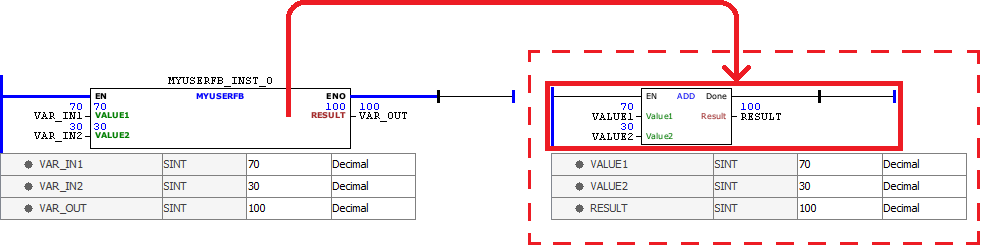
In the example below, the User Function Block 'MYUSERFB' is used to encapsulate a Ladder program that calculates the sum of the input variables VALUE1 and VALUE2, storing the final result in RESULT.
Example in ST
The examples below display the instructions for applying the example above in the ST language.
Example for POU 'USERFB':
VAR VAR_IN1 : SINT := 70; VAR_IN2 : SINT := 30; VAR_OUT : SINT; MYUSERFB_INST_0 : MYUSERFB; END_VAR
MYUSERFB_INST_0( EN:=TRUE, VALUE1:=VAR_IN1, VALUE2:=VAR_IN2, RESULT=>VAR_OUT);
|
|---|
Example for POU 'MYUSERFB':
VAR_INPUT VALUE1, VALUE2 : SINT; END_VAR VAR
END_VAR VAR_OUTPUT RESULT : SINT; END_VAR
RESULT := FB_ADD(Value1:=VALUE1, Value2:=VALUE2);
|
|---|
