|
INWEEKDAY In Weekday Activation |
  
|
|
INWEEKDAY In Weekday Activation |
|
Block that performs a programmed enabling for weekdays based on RTC (Real Time Clock).
Ladder Representation
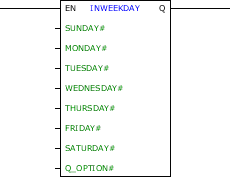
Block Structure
Variable Type |
Name |
Data Type |
Description |
VAR_INPUT |
EN |
BOOL |
Block enabling |
SUNDAY# |
BOOL |
Enabled on Sundays |
|
MONDAY# |
BOOL |
Enabled on Mondays |
|
TUESDAY# |
BOOL |
Enabled on Tuesdays |
|
WEDNESDAY# |
BOOL |
Enabled on Wednesdays |
|
THURSDAY# |
BOOL |
Enabled on Thursdays |
|
FRIDAY# |
BOOL |
Enabled on Fridays |
|
SATURDAY# |
BOOL |
Enabled on Saturdays |
|
Q_OPTION# |
BYTE |
Output operation |
|
VAR_OUTPUT |
Q |
BOOL |
Block output |
Operation
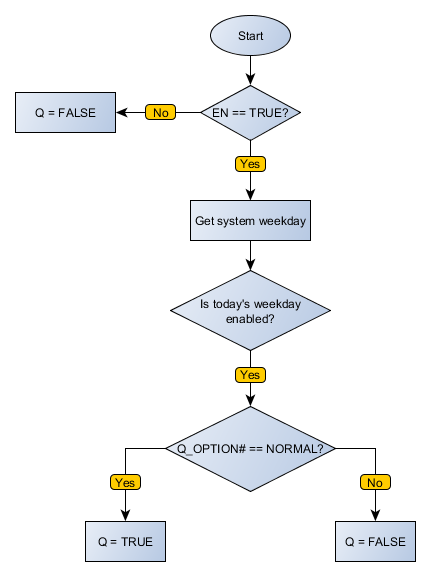
When this block has a TRUE value in EN, it has two modes of operation. If Q_OPTION# is Normal, Q is enabled if the day of week of the internal clock has Enabled parameter in the block. If Q_OPTION# is Inverted, Q is disabled if the day of week of the internal clock has Enabled parameter in the block.
When EN has FALSE value, Q remains FALSE.
|
NOTE! The weekdays are identified by numbers, with Sunday being day 0 and Saturday day 6. |
Block Flowchart
Example in Ladder
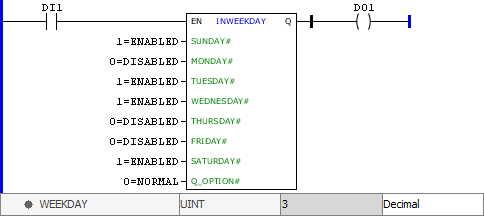
In the above example, the INWEEKDAY block is disabled. This way, regardless of the input, the Q output is disabled.
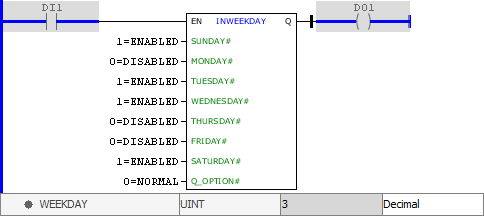
In the example above, the INWEEKDAY block is enabled and Q_OPTION# input is enabled for NORMAL operation. The current day of the week of the device's internal clock is Wednesday (value 3), which has ENABLED status in the programming. This way, the Q output is enabled.
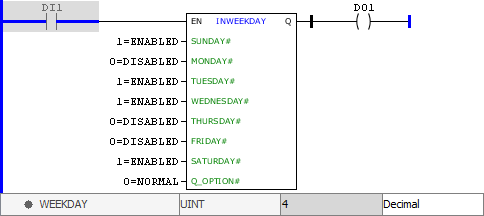
In the example above, the INWEEKDAY block is enabled and Q_OPTION# input is enabled for NORMAL operation. The current day of the week of the device's internal clock is Thursday (value 4), which has DISABLED status in the programming. Thus, the Q output is disabled.
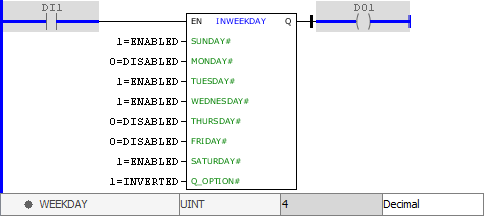
In the example above, the INWEEKDAY block is enabled and Q_OPTION# input is enabled for INVERTED operation. The current day of the week of the device's internal clock is Thursday (value 4), which has DISABLED status in the programming. This way, the Q output is enabled.
Example in ST
The example below displays the instructions for applying the example above in the ST language.
VAR
END_VAR
DO1 := FB_INWEEKDAY( EN:=DI1, SUNDAY:=1, MONDAY:=0, TUESDAY:=1, WEDNESDAY:=1, THURSDAY:=0, FRIDAY:=0, SATURDAY:=1, Q_OPTION:=1);
|
|---|
