|
Watchdog |
  
|
|
Watchdog |
|
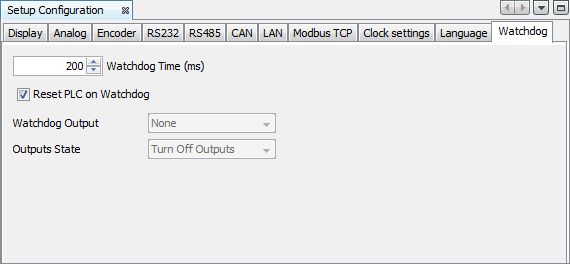
Allows configuring custom watchdog in the PLC300.
| 1. | Time of Watchdog (ms): waiting time of the watchdog. Minimum value: 200ms. |
| 2. | Reset the PLC in case of Watchdog: if checked, this option resets the PLC300 in case of watchdog and runs the user application again after restart. By checking this option, options 3 and 4 are disabled automatically; |
| 3. | Watchdog Output: allows selecting an output for the exclusive use as a flag from the watchdog. |
| 3.1. | The selected output (DO8 or DO9) cannot be written via Ladder. It will remain at a high level after configured for this option and, in the event of watchdog, it will turn off. |
| 4. | Output Status: allows selecting if the digital outputs maintain their status in case of activation of the watchdog or if they will be turned off. |
| 4.1. | This option will have no action on the selected output in option 3. For example: if in option 2 DO9 is selected, even if in option 3 ‘Keeping the status’ is checked, at the moment of watchdog it will be switched off. |
Compatibility
Device |
Version |
PLC300 |
2.30 or higher |