|
Online Commands |
  
|
|
Online Commands |
|
Overview
The online commands are commands performed when the device is communicating with the application (online monitoring active).
With the online commands it is possible:
| • | To perform the commands for recording and loading the resource, setup and firmware files. |
| • | To configure the device number. |
| • | To stop and run the program and delete the resource. |
Saving and loading configuration
The commands for recording the resource, setup and firmware files make a copy of the device binary files to the SD card. The loading of the files make the copy of the binary files from the SD card to the device.
For the security of the files, it is possible to configure a protection password. It is also possible to configure the number of devices so that backup files will be copied to different folders.
Saving and loading command
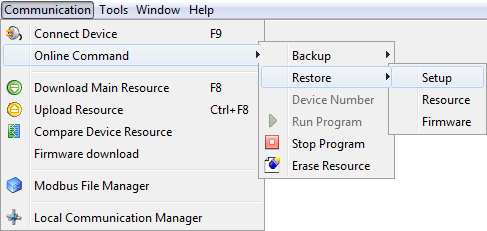
To perform the commands for recording and loading the resource, setup and firmware, it is necessary to select the menu Communication > Online commands > choose one of the options listed Save/Load and then Resource/Setup/Firmware.
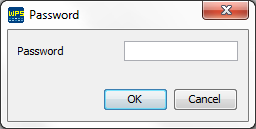
If a password has been configured for the resource, a dialog window prompting the password will show. The password has one to eight decimal digits.
Password configuration
The password configuration for the online commands is done trough the configuration of the resource properties, in the password option.
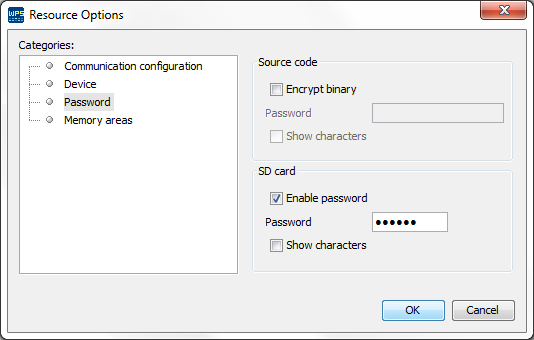
After entering the password (with one to eight decimal digits), it is necessary to build the resource and send it to the device. The password will be stored on the equipment and, when one of the online commands is performed, the password is requested. The password will not be requested again until that the online monitoring is completed.
Device number
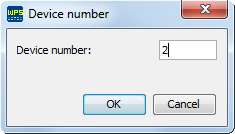
The device number is configured to record the backup of different devices on the same SD card. When selecting the functions for recording resource, setup or firmware, the files will be recorded on the following folders, according to the device number (1 in the example).
\PLC300\0001\Resource
\PLC300\0001\Setup
\PLC300\0001\Firmware
|
ATTENTION! Existing files in the destination folder will be overwritten when you perform recording functions. |
Run program 
It runs the user’s program.
In order to perform the run program command, it is necessary to select the menu Communication > Online commands > Run program.
Stop program 
Stop the user’s program.
In order to perform the stop program command, it is necessary to select the menu Communication > Online commands > Stop program.
Erase resource 
It erases the resource recorded on the device.
In order to perform the delete program command, it is necessary to select the menu Communication > Online commands > Delete program.
