|
Overview |
  
|
|
Overview |
|
Wizards allow the user to configure and monitor variables of the configured equipment in the resource through predefined windows.
Below is an overview of the Wizards in WPS v3.1X.
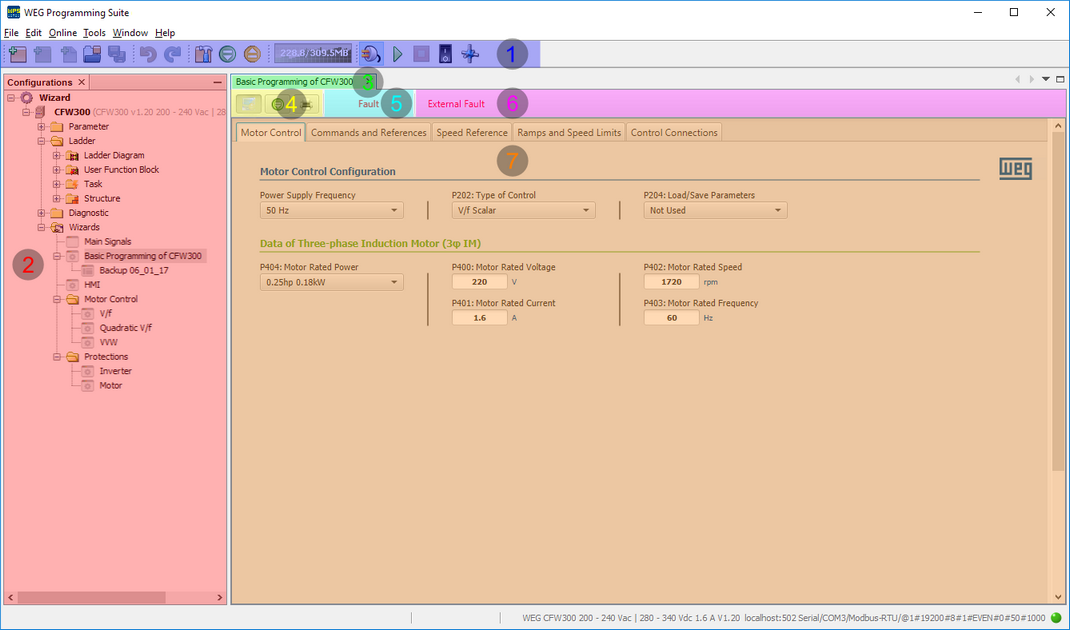
| 1. | Toolbar: displays the main commands of the software and contains the Connect Device button  required for writing and reading the equipment variables; required for writing and reading the equipment variables; |
| 2. | Configurations Window: displays the configurations, where each configuration contains resources, and the resource contains the monitoring and configuration wizards; |
| 3. | Wizard Title: displays the title of the open wizard; |
| 4. | Wizard Toolbar: displays the commands for upload and monitoring  , writing , writing  and printing and printing  values of a configured wizard variables (Configuration Wizards only); values of a configured wizard variables (Configuration Wizards only); |
| 5. | Equipment Status: displays the status of the connected equipment (Configuration Wizards only); |
| 6. | Message from an Equipment Status: displays the message of an alarm, failure or configuration status of the connected equipment (Configuration Wizards only); |
| 7. | Equipment Variable Area: displays the writing and reading variables of the configured equipment and can contain tabs for better division of the equipment's features. |