|
MC_Stop Axis Controlled Stop |
  
|
|
MC_Stop Axis Controlled Stop |
|
Block responsible for executing a controlled stop.
Ladder Representation
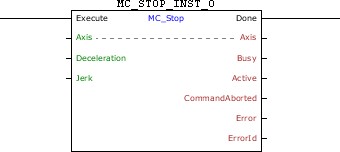
Execution Features
Program Memory Size |
52 Bytes |
Data Memory Size |
12 Bytes |
Block Structure
Variable Type |
Name |
Data Type |
Description |
VAR_IN_OUT |
Axis |
BYTE |
Selection of operation axis (0 - Real axis) (1 - Virtual 1 axis) |
VAR_INPUT |
Execute |
BOOL |
Block enabling |
Deceleration |
REAL |
Deceleration of the stop |
|
Jerk |
REAL |
Jerk [rpm/s²] |
|
VAR_OUTPUT |
Done |
BOOL |
Output enabling |
Busy |
BOOL |
Flag indicating the block has not yet been ended |
|
Active |
BOOL |
Block flag with control on the axis |
|
CommandAborted |
BOOL |
Flag of aborted command |
|
Error |
BOOL |
Error in the execution flag |
|
ErrorID |
WORD |
Identifier of the occurred error |
|
VAR |
MC_STOP_INST_0 |
MC_STOP |
Instance of access to block structure |
Operation
When this block detects a leading edge in Execute, it sends a command for a controlled stop of the axis. While Execute has TRUE level, no other MC block is executed.
When the MC_Stop block is executed, the drive will star operating in grid position and remain this way even after the conclusion of the block. The position proportional gain must be set (P0159) so as to obtain a better drive performance.
In the execution of the block, the axis status will change to Stopping. When the stop is ended and the block is no longer active, the axis status will change to Standstill.
When Execute has FALSE value, Done remains FALSE. The Done output is activated when the block finishes the execution successfully, remaining at TRUE level until Execute receives FALSE.
If there is any error in the execution, the Error output is enabled and ErrorID displays an error code according to the table below.
Code |
Description |
64 |
Deceleration programmed below the minimum allowed. |
65 |
Deceleration programmed above the maximum allowed. |
67 |
Drive in the "Disabled" or "Errorstop" status. |
71 |
P202 different from 4. |
78 |
MC block not executed – Internal fault. |
93 |
Jerk programmed below the minimum allowed. |
94 |
Jerk programmed above the maximum allowed. |
Example in Ladder
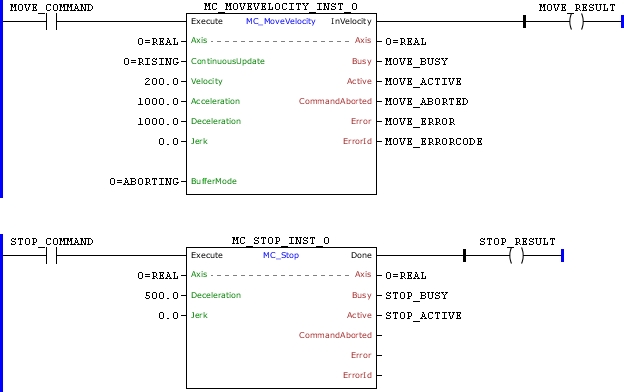
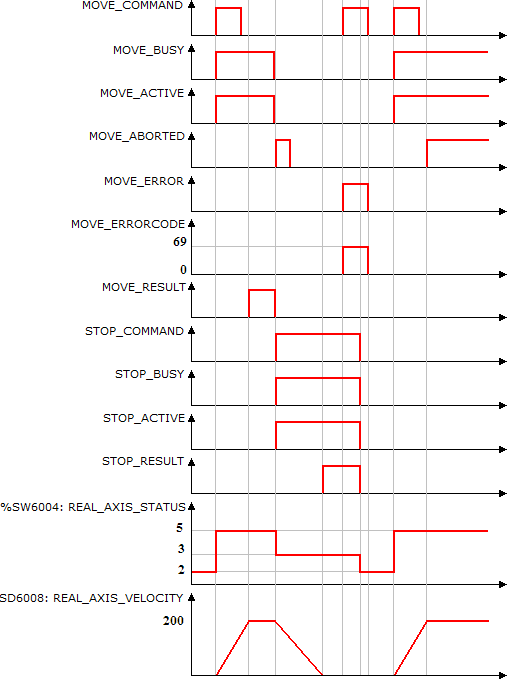
In the up transition of MOTION_COMMAND, the MC_MotionVelocity block is executed. With this, the Busy and Active signals of this block are set and the motion to reach the speed of 200 RPM starts. The axis status (%SW6004) changes from Standstill (2) to Continuous Motion (5).
At the moment the speed reaches 200 rpm, MOTION_RESULT is set.
With the up transition of STOP_COMMAND, the MC_Stop block is instantly executed; thus, the Busy and Active signals of this block are set and the stop starts. At the same time, the Busy, Active and InVelocity signals of the MC_MotionVelocity block are reset and the CommandAborted signal is set for 1 scan. The axis status (%SW6004) changes from Continuous Motion (5) to Stopping (3).
At the end of the stop, the Done output MC_Stop block is set and remains until Execute input is reset. The axis status (%SW6004) remains equal to Stopping (3) and no other MC block will be executed.
With the transition of rising of MOTION_COMMAND, the MC_MotionVelocity block is started, but as the MC_Stop block is active, an error occurs and the Error signal will be set by entering the value 69 in ErrorID.
When the Execute input of the MC_Stop block is reset, the Busy, Active and Done signal are reset. The axis status (%SW6004) changes from Stopping (3) to Standstill (2) and other MCs blocks can be executed.
Example in ST
The example below displays the instructions for applying the example above in the ST language.
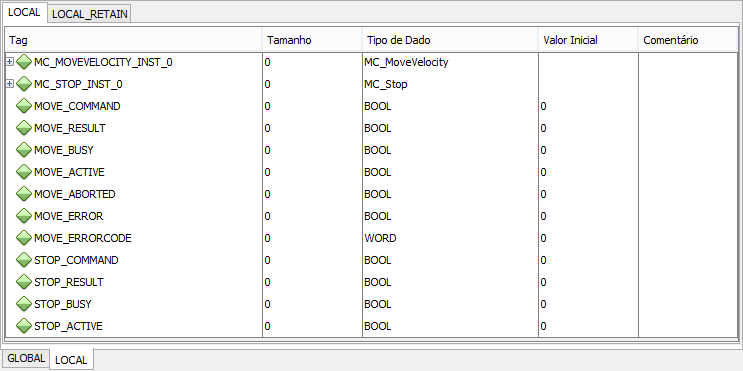
VAR STOP_COMMAND, STOP_RESULT, MOVE_COMMAND, MOVE_RESULT, MOVE_BUSY, MOVE_ACTIVE, MOVE_ABORTED, MOVE_ERROR, STOP_BUSY, STOP_ACTIVE : BOOL; MOVE_ERROCODE : UINT; MC_STOP_INST_0 : FB_MC_Stop; MC_MOVEVELOCITY_INST_0 : FB_MC_MoveVelocity; END_VAR
MC_MOVEVELOCITY_INST_0.Execute := MOVE_COMMAND; MC_MOVEVELOCITY_INST_0( Axis:=0, ContinuousUpdate:=0, Velocity:=200.0, Acceleration:=1000.0, Deceleration:=1000.0, Jerk:=0.0, BufferMode:=0); MOVE_BUSY := MC_MOVEVELOCITY_INST_0.Busy; MOVE_ACTIVE := MC_MOVEVELOCITY_INST_0.Active; MOVE_ABORTED := MC_MOVEVELOCITY_INST_0.CommandAborted; MOVE_ERROR := MC_MOVEVELOCITY_INST_0.Error; MOVE_ERROCODE := MC_MOVEVELOCITY_INST_0.ErrorID; MOVE_RESULT := MC_MOVEVELOCITY_INST_0.InVelocity;
MC_STOP_INST_0.Execute := STOP_COMMAND; MC_STOP_INST_0(Axis:=0, Deceleration:=500.0, Jerk:=0.0); STOP_BUSY := MC_STOP_INST_0.Busy; STOP_ACTIVE := MC_STOP_INST_0.Active; STOP_RESULT := MC_STOP_INST_0.Done;
|
|---|