|
COMPGE |
  
|
|
COMPGE |
|
Block that compares the values of Value1 and Value2, enabling the output Q if Value1 is higher than or equal to Value2.
Ladder Representation
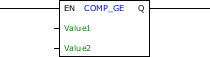
Block Structure
Variable Type |
Name |
Data Type |
Description |
VAR_INPUT |
EN |
BOOL |
Block enabling |
Value1 |
BYTE USINT SINT WORD UINT INT DWORD UDINT DINT REAL LREAL |
First value of comparison |
|
Value2 |
BYTE USINT SINT WORD UINT INT DWORD UDINT DINT REAL LREAL |
Second value of comparison |
|
VAR_OUTPUT |
Q |
BOOL |
Indicator of equality or majority of Value1 |
Operation
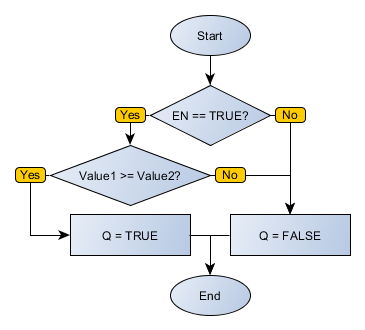
When this block has a TRUE value in EN it sends the Q output to the TRUE value if Value1 is higher than or equal to Value2. Otherwise, Q receives FALSE.
When EN has FALSE value, Q remains in FALSE.
Block Flowchart
Example in Ladder
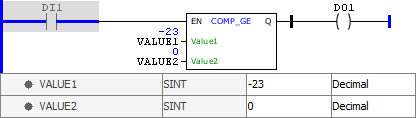
The example above checks equality or majority of VALUE1 in relation to VALUE2. Since VALUE1 has lower value than VALUE2, the Q output is disabled.
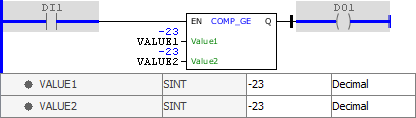
The example above checks equality or majority of VALUE1 in relation to VALUE2. Since both variables have the same value, the Q output is activated.
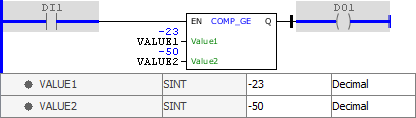
The example above checks equality or majority of VALUE1 in relation to VALUE2. Since VALUE1 has higher value than VALUE2, the Q output is activated.
Example in ST
The example below displays the instructions for applying the example above in the ST language.
VAR VALUE1 : SINT := -23; VALUE2 : SINT := -50; END_VAR
DO1 := FB_COMP_GE(EN:=DI1, Value1:=VALUE1, Value2:=VALUE2);
|
|---|