|
PTSCONTACT |
  
|
|
PTSCONTACT |
|
Leading edge transition contact.
Ladder Representation
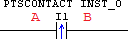
Block Structure
Variable Type |
Name |
Data Type |
Description |
VAR_INPUT |
I1 |
BOOL |
Block control input |
VAR |
PTSCONTACT_INST_0 |
PTSCONTACT |
Instance of access to block structure |
Operation
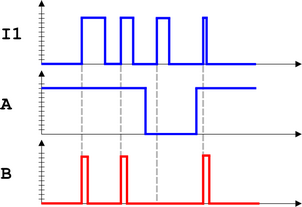
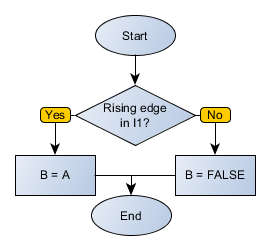
At the instant the variable I1 transitions from FALSE to TRUE (leading edge or positive edge transition), B receives the value of A for a scan cycle.
At all other times, B receives the FALSE value.
|
NOTE! Watch out for series and parallel associations of contacts. Refer to section Contact Logic for further information. |
Diagram
Block Flowchart
Example in Ladder

The above example resets the digital output DO1 if the SHIFT key is pressed and a positive pulse on the digital input DI2 is given.
Example in ST
The example below displays the instructions for applying the example above in the ST language.
VAR PTSCONTACT_INST_0 : FB_PTSCONTACT; END_VAR
PTSCONTACT_INST_0(EN:=KEY_SHIFT, BIT:=DI2); DO1 := FB_RESETCOIL(EN:=PTSCONTACT_INST_0.Q);
|
|---|
