|
ARRAYCOPY Array copy |
  
|
|
ARRAYCOPY Array copy |
|
Block that copies an array from a certain position to another array or to itself.
Ladder Representation
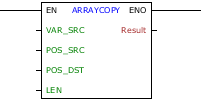
Block Structure
Variable Type |
Name |
Data type |
Description |
VAR_INPUT |
EN |
BOOL |
Block enabling |
VAR_SRC |
Array: BYTE USINT SINT WORD UINT INT DWORD UDINT DINT REAL LREAL |
Input Array |
|
POS_SRC |
BYTE USINT WORD UINT |
Position of the input array from which the copy will be made |
|
POS_DST |
BYTE USINT WORD UINT |
Position of the output array from which it will be replaced |
|
LEN |
BYTE USINT WORD UINT |
Number of array positions to be copied |
|
VAR_OUTPUT |
ENO |
BOOL |
End of operation |
Result |
Array: BYTE USINT SINT WORD UINT INT DWORD UDINT DINT REAL LREAL |
Output Array |
Operation
This block, when it has a value of TRUE in EN, copies LEN values from the POS_SRC position from the input array (VAR_SRC) to the position POS_DST into the destination array (Result).
Comments:
- POS_SRC, POS_DST and LEN input variables only accept positive integers. If a negative value is assigned to any of them, the value zero will be considered.
- The Input Array can be repeated on the output without worrying about data being overwritten.
- If the amount of data to be copied defined by LEN exceeds the last position of the input array, only valid data will be copied to the last position of the input array, thus avoiding any garbage being assigned to the output array.
- If the amount of data to be copied defined by LEN exceeds the last position of the output array, only the data required to complete it will be copied, preventing subsequent memory from receiving unwanted values.
- The block will not execute if LEN has a value greater than the size of the input array.
When EN has FALSE value, Result remains unchanged.
The ENO value forwards to the next Ladder block the EN value after the operation is completed.
|
NOTE!
|
Block Flowchart

Example in Ladder
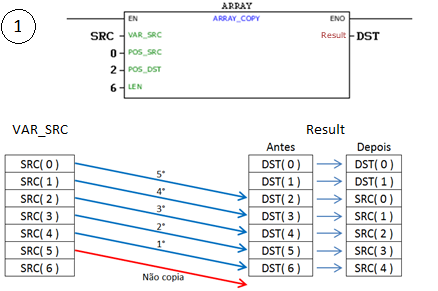
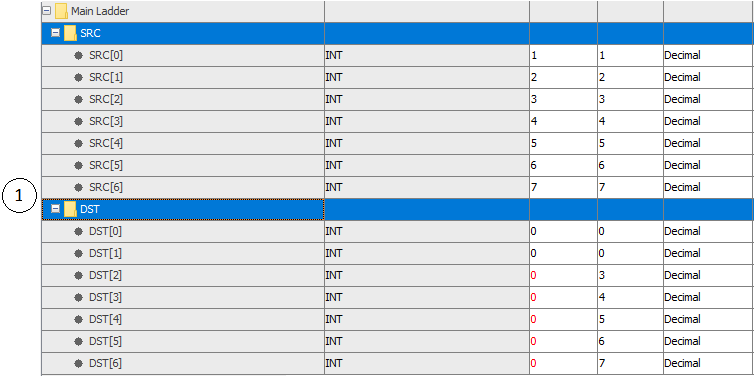
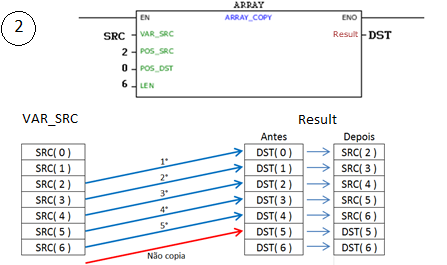
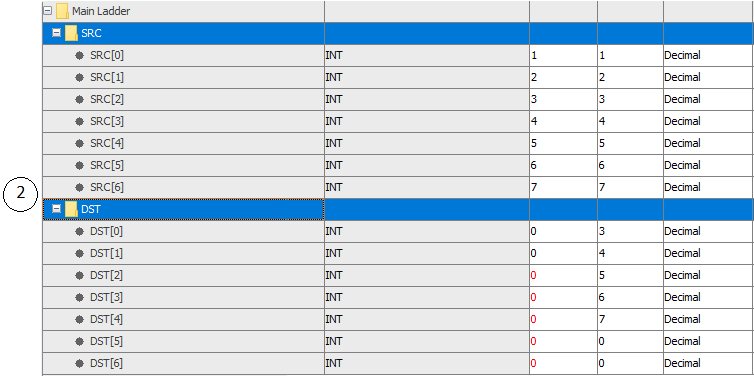
In the examples above the value of the variable SRC is copied to DST array, according to source position (POS_SRC), destination (POS_DST) and the lenght to be copied (LEN). The block ends with success and ENO output is activated.
Example in ST
The example below displays the instructions for applying the example above in the ST language.
VAR SRC : ARRAY[0..5] OF INT := [1, 2, 3, 4, 5, 6]; DST : ARRAY[0..5] OF INT; END_VAR
DST := FB_ARRAYCOPY(SRC, 0, 2, 6);
|
|---|
