|
Force I/O |
  
|
|
Force I/O |
|
Overview
The force inputs and outputs window is used for the values of the digital and analog inputs to be read by the program, by values manipulated by the user, regardless their physical state. It also allows the manipulation of the physical states of the digital and analog outputs by the user independently of the values calculated by the program.
In order to force the device inputs and outputs, it is necessary that the online monitoring be active and the option Run cyclically be enabled. The data are sent to the device every 2 seconds.
The values can be edited with the device disconnected. The configurations are stored in the resources and recorded whenever the main resource selection is changed.
The data displayed on the force I/O window contain the values belonging to the resource (and configuration) selected as main.
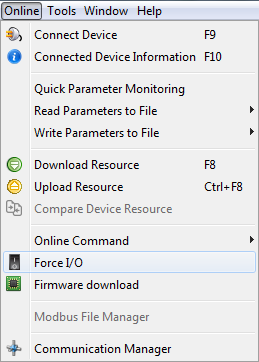
The force I/O window is open trough the menu Online > Force I/O:
Toolbar
The toolbar of the force window has the options to run cyclically, upload the device force configuration, enable all and disable all:
 Run cyclically: Sends the user's configurations to the device and updates the state of the inputs and outputs in a cyclic way.
 Upload configuration: Allows the current configuration of the device to be read. For this option to be enabled, it is necessary that the online monitoring be active and the option run cyclically be disabled.
 Enable all: Enables the force I/O of all of the inputs and outputs of the device.
 Disable all: Disables the force I/O of all of the inputs and outputs of the device.
Input and Output commands
For each digital and analog input and output there is a selection box linked to enable the force, a status field and an edition field.
Digital:
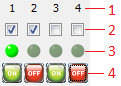
| 1. | Number of the digital inputs/output |
| 2. | Enable/disable Force I/O |
| 3. | Current status of the I/O: It has three statuses: 1. light green LED: activated; 2. dark green LED: deactivated; 3. gray LED: the value is not being read. |
| 4. | Enable/disable the input/output |
Analog:

| 1. | Number of the analog input/output |
| 2. | Enable/disable Force I/O |
| 3. | Current value of the input/output |
| 4. | Value of the input/output configured by the user |
|
NOTE! The analog signal scale has 15 bits plus 1 bit for signal, except for SSW900 which it has only 10 unsigned bits. |
|
NOTE! Some products have accessories with different characteristics. In this way, some features of the slot, although existing in Force I/O, will not take effect if values are entered (for example: CFW900). |
