|
Main Signals |
  
|
|
Main Signals |
|
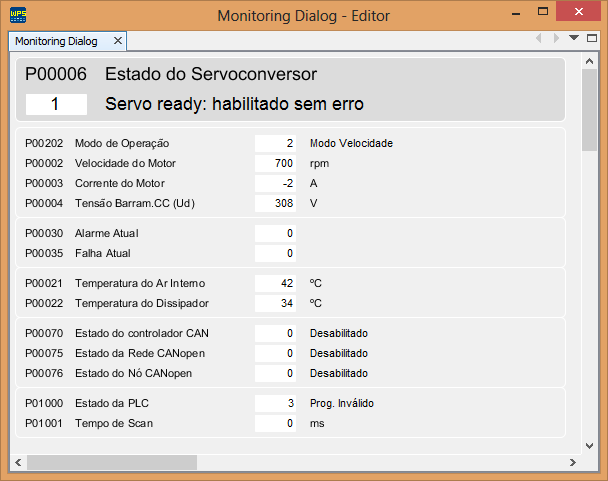
The Main Signals window provides a general view of the main signals of the equipment:
| • | Drive status (P00006), |
| • | General indications (P00202, P00002, P00003 and P00004), |
| • | Alarm (P00030) and fault (P00035), |
| • | Temperatures (P00021 and P00022), |
| • | Network status (P00070, P00075 and P00076), and |
| • | PLC information (P01000 and P01001). |
The main signals are detailed below.
Parameter |
Function |
Description |
P00006 |
Servodrive Status |
It indicates the current status of the servodrive |
P00202 |
Operation Mode |
It defines the operation mode of the servodrive, that is, which variable will be controlled: Torque, Speed or if the control will be done via Ladder, CANopen or Profibus |
P00002 |
Motor Speed |
It indicates the effective speed value in rpm, except when programmed to receive external position / speed feedback |
P00003 |
Motor Current |
It indicates the output Iq current, in amperes rms, of the servodrive |
P00004 |
DC Link voltage |
It indicates the present voltage on the DC Link in volts (V) |
P00030 |
Present Alarm |
It indicates the number of the alarm which may be present on the servodrive |
P00035 |
Present Fault |
It indicates number of the fault which may be present on the servodrive. |
P00021 |
Internal Air Temperature |
This parameter presents, in Celsius degrees, the internal air temperature |
P00022 |
Heatsink Temperature |
This parameter presents, in Celsius degrees, the heatsink temperature |
P00070 |
CAN Controller Status |
It indicates the CAN controller status, responsible for sending and receiving CAN telegrams |
P00075 |
CANopen Network Status |
It indicates the CANopen communication status, informing if the protocol was initialized correctly and the status of the slave guarding service |
P00076 |
CANopen Node Status |
Each device in the CANopen network has an associated status. It is possible to see the present status of the servodrive through this parameter |
P01000 |
PLC Status |
It allows the user to view the program status |
P01001 |
Scan Time |
It allows the user to monitor the scan cycle time of the program in milliseconds |
The window may be viewed below.