|
MBTCP_ReadBinary Leitura de Binários em rede Modbus TCP |
  
|
|
MBTCP_ReadBinary Leitura de Binários em rede Modbus TCP |
|
Block that performs a reading of up to 128 binary data (via Read Coils or Read Discrete Inputs) of a server on the Modbus TCP network.
Ladder Representation
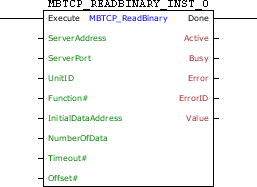
Block Structure
Variable Type |
Name |
Data Type |
Description |
VAR_INPUT |
Execute |
BOOL |
Block enabling |
ServerAddress |
DWORD |
Server IP address (Ex: 192.168.0.1) |
|
ServerPort |
WORD |
Modbus TCP Port of the server (Standard: 502) |
|
UnitID |
BYTE |
UnitID do servidor (Standard: 255) |
|
Function# |
BYTE |
Reading function code |
|
InitialDataAddress |
WORD |
Initial bit address of the data to be read |
|
NumberOfData |
BYTE |
Number of bits to be read (1 to 128) |
|
Timeout# |
WORD |
Maximum waiting time for the server response [ms] |
|
Offset# |
BOOL |
Offset Indication in InitialDataAddress, i.e., need to subtract 1 from this number |
|
VAR_OUTPUT |
Done |
BOOL |
Output enabling |
Active |
BOOL |
Awaiting response flag |
|
Busy |
BOOL |
Flag indicating the connection is busy with another request |
|
Error |
BOOL |
Error in the execution flag |
|
ErrorID |
BYTE |
Identifier of the occurred error |
|
Value |
BOOL |
Variable that stores the received data |
|
VAR |
MBTCP_READBINARY _INST_0 |
MBTCP_READBINARY |
Instance of access to block structure |
Operation
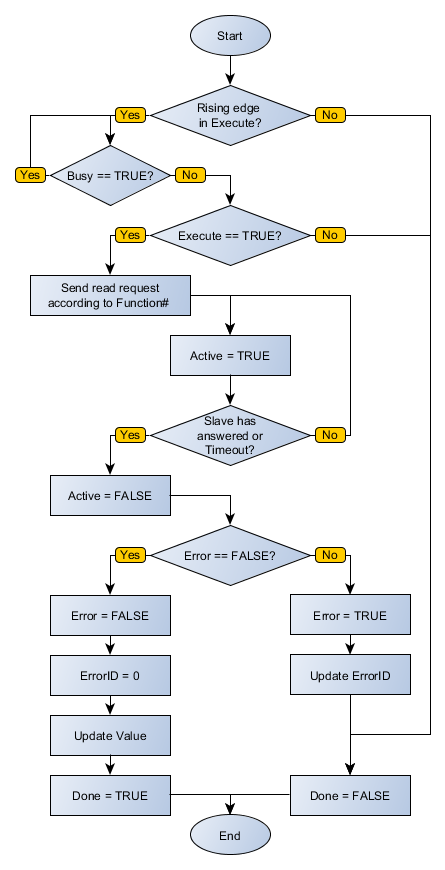
When this block detects a leading edge on Execute, it checks whether the Modbus TCP server in specified address in ServerAddress is free to send data (Busy variable at FALSE level). If so, it sends the reading request of a number of bits indicated by NumberOfData in InitialDataAddress address using chosen function in Function# and sets the Active output, resetting it when receiving the response from the server. The received data is stored in the Value variable. If the server is not free, the block waits Busy go to FALSE level to resubmit the request.
|
NOTE! If Execute goes to FALSE level and Busy is still at TRUE level, the request is canceled. |
|
NOTE! Value is an array of size equal to NumberOfData. It is important to check this compatibility not to generate errors in the block. |
When Execute has FALSE value, Done remains FALSE. The Done output is only activated when the block finishes executing successfully, remaining at TRUE level until Execute receives FALSE.
If there is any error in the execution, the Error output is enabled and ErrorID displays an error code according to the table below.
Code |
Description |
0 |
Executed successfully |
1 |
Invalid input data |
2 |
Client not enabled |
4 |
Timeout in server response |
5 |
Server returned error |
6 |
Failed to connect to server |
7 |
TCP/IP connection terminated prematurely |
Compatibility
Device |
Version |
PLC300 |
1.30 or higher |
Block Flowchart
Example in Ladder
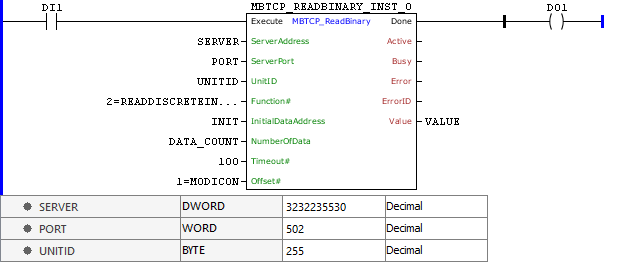
The above example requests reading of a number of binary data described by DATA_COUNT positioned in the INIT – 1 in Modbus TCP server of SERVER:PORT address through the Read Discrete Input function. These data are forwarded to VALUE. The block ends successfully, Done output is activated.
Example in ST
The example below displays the instructions for applying the example above in the ST language.
VAR SERVER : DWORD := 16#C0A8000A; // 192.168.0.10 = 3232235530 PORT : WORD := 502; UNITID : BYTE := 255; INIT : WORD; DATA_COUNT : BYTE; VALUE : ARRAY [0..4] OF BOOL; MBTCP_READBINARY_INST_0 : FB_MBTCP_ReadBinary; END_VAR
MBTCP_READBINARY_INST_0.Execute := DI1; MBTCP_READBINARY_INST_0( ServerAddress:=SERVER, ServerPort:=PORT, UnitID:=UNITID, Function:=2, InitialDataAddress:=INIT, NumberOfData:=DATA_COUNT, Timeout:=100, Offset:=1, Value=>VALUE); DO1 := MBTCP_READBINARY_INST_0.Done;
|
|---|
