|
Modbus File Manager |
  
|
|
Modbus File Manager |
|
Overview
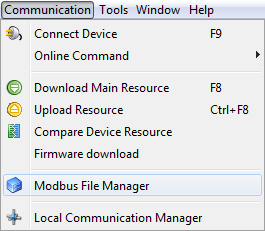
The modbus file manager of the PLC300 is accessed through the communication menu as shown in the following figure.
The window of the modbus file manager is composed of the following parts as shown in the following figure.
| 1. | Toolbar with all the tools of the file manager. |
| 2. | Folder list of the SD Card. |
| 3. | File list of the selected folder. |
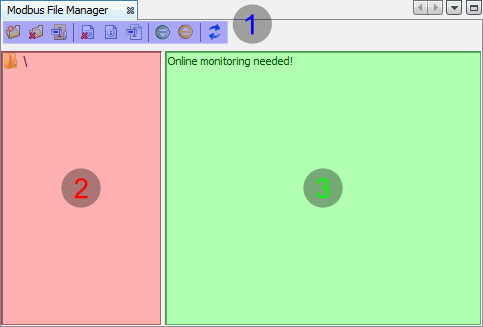
It is only possible to view the files and folders of the SD Card when the WPS is connected to the PLC300 through the command Connect Device  .
.
Toolbar
 Creates a new folder
 Erases the selected folder
 Renames the selected folder
 Erases the selected file
 Displays the properties of the selected file (path, size and date)
 Renames the selected file
 Sends the file to the PLC300
 Receives the selected file from the PLC300
Popup menu
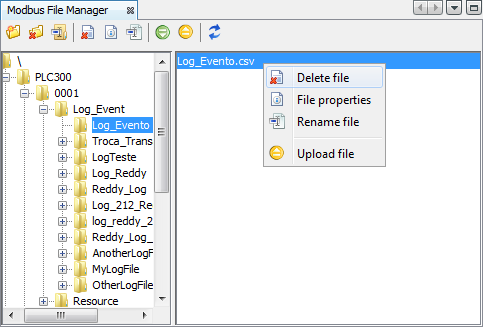
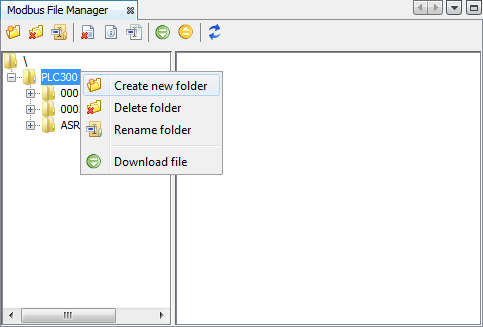
In order to access the popup menu, just click the right button on a folder or on a file and it will be displayed as shown in the following figure.
Popup menu for folders:
Popup menu for files: