|
TON Timer On-Delay |
  
|
|
TON Timer On-Delay |
|
Timer block that, when energized, enables the output after a delay set by PT.
Ladder Representation
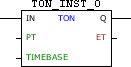
Block Structure
Variable Type |
Name |
Data Type |
Description |
VAR_INPUT |
IN |
BOOL |
Block enabling |
PT |
WORD UINT DWORD1 UDINT1 |
Delay of output drive |
|
TIMEBASE |
WORD |
Time base for PT and ET |
|
VAR_OUTPUT |
Q |
BOOL |
Block output |
ET |
WORD UINT DWORD1 UDINT1 |
Counter elapsed time |
|
VAR |
TON_INST_0 |
TON |
Instance of access to block structure |
|
NOTE! 1. In CFW300 and CFW100, the PT and ET field types can only be WORD or UINT. 2. Some devices allow you to configure user parameters, but these need to be configured for use in the fields PT and ET, where it is necessary to select a compatible data type as shown in table above. For more information refer to the corresponding topic; 3) The TIMEBASE field may vary depending on the device used. |
Operation
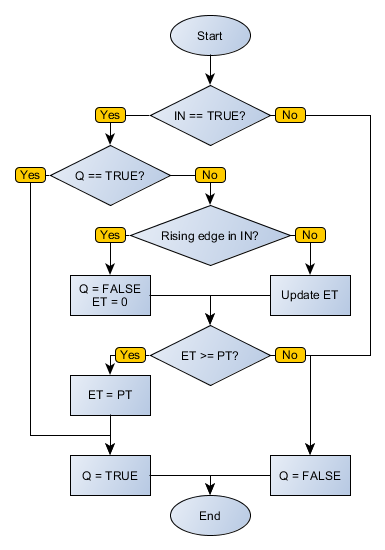
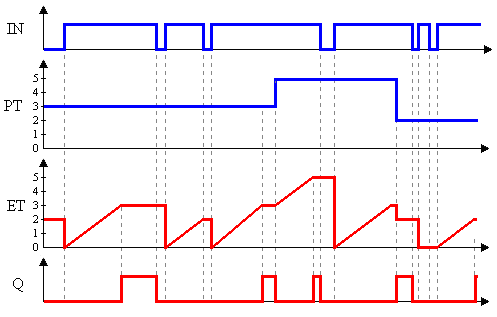
While the IN input is FALSE, the Q output is FALSE and ET also receives the value zero.
On the edge positive transition in IN, counting is triggered and ET is incremented according to TIMEBASE. When ET equals PT, the Q output goes to state TRUE until IN revolutions to FALSE.
Compatibility
Device |
Version |
PLC300 |
1.50 or higher |
SCA06 |
2.00 or higher |
Block Flowchart
Operation Diagram
Example in Ladder

The above example shows the initial conditions of the block and of the routine variables.
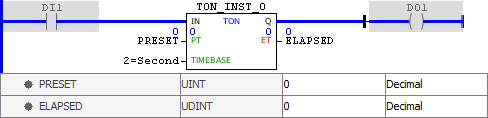
When activated the IN input, counting is triggered. Since ET equals PT, the Q output is enabled.
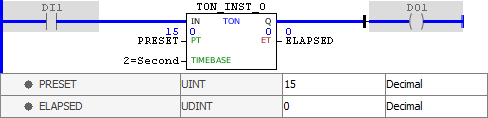
Note that a change in PRESET variable is not forwarded to the PT field while the IN entry remains enabled.
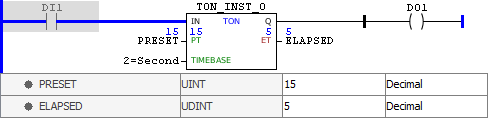
Disabling the IN input, the value of PT is updated and the Q output is disabled. When activating it again, counting is triggered.
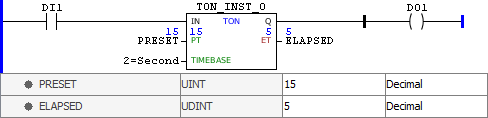
Disabling the IN input, the value of ET remains saved.
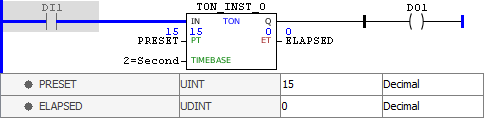
Enabling the IN input, the value of ET is reset and counting is triggered.
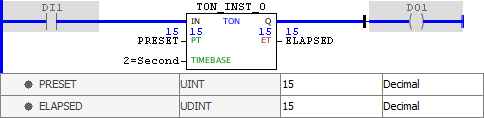
When ET reaches the value PT, the Q is output enabled and remains so while IN is at TRUE level.
Example in ST
The example below displays the instructions for applying the example above in the ST language.
VAR PRESET : UINT := 15; ELAPSED : UDINT; TON_INST_0 : FB_TON; END_VAR
TON_INST_0.IN := DI1; TON_INST_0(PT:=PRESET, TIMEBASE:=2); // TIMEBASE according to ELAPSED := TON_INST_0.ET; // the device used DO1 := TON_INST_0.Q;
|
|---|
