|
Operation |
  
|
|
Operation |
|
The Hot Donwload function is enabled when:
| 1. | A complete download of the compiled resource has been done previously; |
| 2. | Have sufficient resource memory space. |
After compiling, the output window indicates a warning (W4002) if the Hot Download function is disabled due to lack of memory.
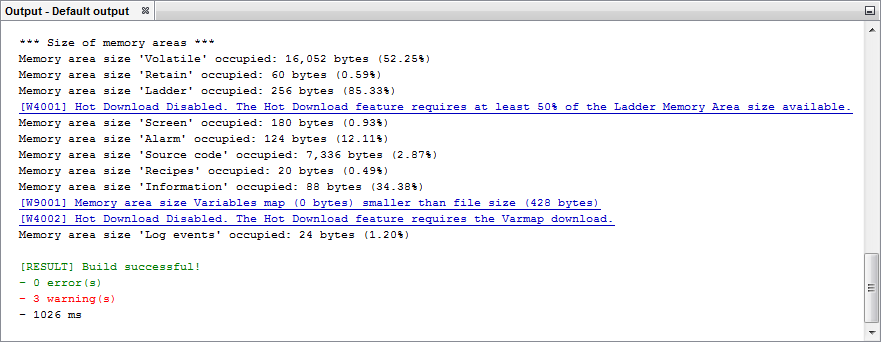
Figure 1 - Warnings of insufficient memory for Hot Download displayed on the compilation window
After realizing the desired changes on the resource, the beginning of the download routine will verify if the resource edited is the same as the resource executing on the equipment.
Case both be equal, is then displayed a dialog window for selection between Full Download or Hot Download.
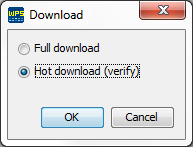
Figura 2 - Dialog window to choose between Full Download and Hot Download
Case the option Hot Download be selected, then is realized a verification to know if any restriction has been violated. Case it was, a message of error will be displayed informing the cause.
Validated the verification, is then realized a comparison of the memory areas, the files that were changed are displayed in red.
|
NOTE! The variables map is presented on the gray color, since its download is obligatory in case of changes. |
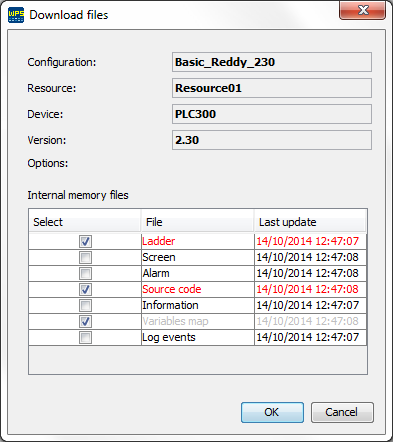
Figure 3 - Files selection window for Hot Download
Case any file be sent to the equipment without the source code, this will become invalid, thus disabling your upload.
This procedure is realized because the source code don't represent anymore the files presented in the memory areas.
|
NOTE! The source code becomes invalid even that it be equal to the previously saved on the equipment. |
