SEL
SEL selects one of two input values and writes it to Result according to the state of Selector.
Ladder Representation

Variable Table
| Variable Type | Name | Data Type | Description |
|---|---|---|---|
| VAR_INPUT | EN | BOOL | Enables block execution. |
| VAR_INPUT | Selector | BOOL | Selects which input is copied to the output. |
| VAR_INPUT | Value0 | BYTE USINT SINT WORD UINT INT DWORD UDINT DINT REAL STRING | First input value. |
| VAR_INPUT | Value1 | BYTE USINT SINT WORD UINT INT DWORD UDINT DINT REAL STRING | Second input value. |
| VAR_OUTPUT | ENO | BOOL | Indicates the end of the operation. |
| VAR_OUTPUT | Result | BYTE USINT SINT WORD UINT INT DWORD UDINT DINT REAL STRING | Selected output value. |
Operation
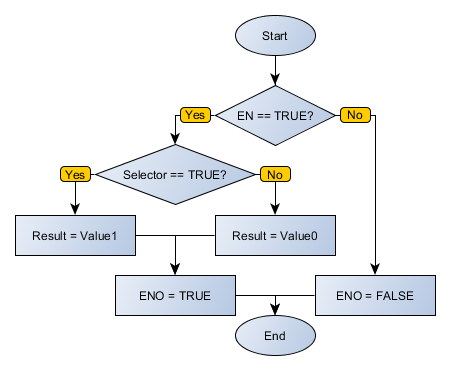
When EN is TRUE, SEL writes Value0 to Result when Selector is FALSE. When Selector is TRUE, SEL writes Value1 to Result.
When EN is FALSE, Result remains unchanged.
ENO passes the EN value to the next Ladder block after the operation finishes.
Execution Flowchart
Examples
- Ladder Example
- Structured Text Example
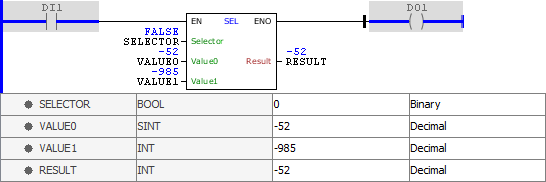
In this example, SELECTOR is FALSE, so RESULT receives VALUE0. The block finishes successfully and activates ENO.
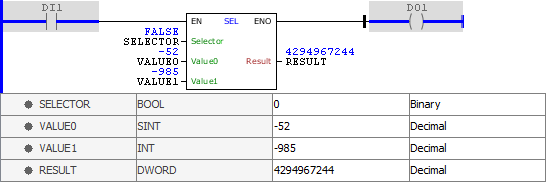
This example also uses SELECTOR as the selection input. With SELECTOR at FALSE, RESULT receives VALUE0. The binary pattern is preserved even though the decimal representation is not valid for negative values in DWORD.
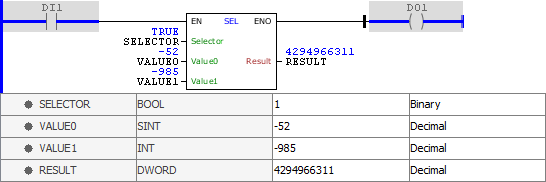
In this example, SELECTOR is TRUE, so RESULT receives VALUE1. The binary pattern is preserved even though the decimal representation is not valid for negative values in DWORD.
The following Structured Text example applies the same selection logic.
VAR
    SELECTOR : BOOL := FALSE;
    VALUE0 : SINT := _52;
    VALUE1 : INT := _985;
    RESULT : INT;
END_VAR

RESULT := FB_SEL(
    EN:=DI1,
    Selector:=SELECTOR,
    Value0:=VALUE0,
    Value1:=VALUE1,
    ENO=>DO1);