MB_WriteBinary
MB_WriteBinary writes binary values to a Modbus RTU slave using Write Single Coil or Write Multiple Coils.
Ladder Representation

Block Structure
| Variable Type | Name | Data Type | Description |
|---|---|---|---|
| VAR_INPUT | Execute | BOOL | Enables block execution. |
| VAR_INPUT | SlaveAddress | BYTE | Modbus RTU slave address. |
| VAR_INPUT | Function# | BYTE | Function code used for the write request. |
| VAR_INPUT | InitialDataAddress | WORD | Initial bit address where the data will be written. |
| VAR_INPUT | NumberOfData | BYTE | Number of bits to write (1 to 128). |
| VAR_INPUT | Timeout# | WORD | Maximum time to wait for the response, in milliseconds. |
| VAR_INPUT | Offset# | BOOL | Indicates whether the block must subtract 1 from InitialDataAddress. |
| VAR_INPUT | Value | BOOL | Variable that stores the binary data to write. |
| VAR_OUTPUT | Done | BOOL | Indicates that the block completed successfully. |
| VAR_OUTPUT | Active | BOOL | Indicates that the block is waiting for a response. |
| VAR_OUTPUT | Busy | BOOL | Indicates that the RS485 interface is busy with another request. |
| VAR_OUTPUT | Error | BOOL | Indicates an execution error. |
| VAR_OUTPUT | ErrorID | BYTE | Execution error identifier. |
| VAR | MB_WRITEBINARY | MB_WRITEBINARY | Block structure access instance. |
Operation
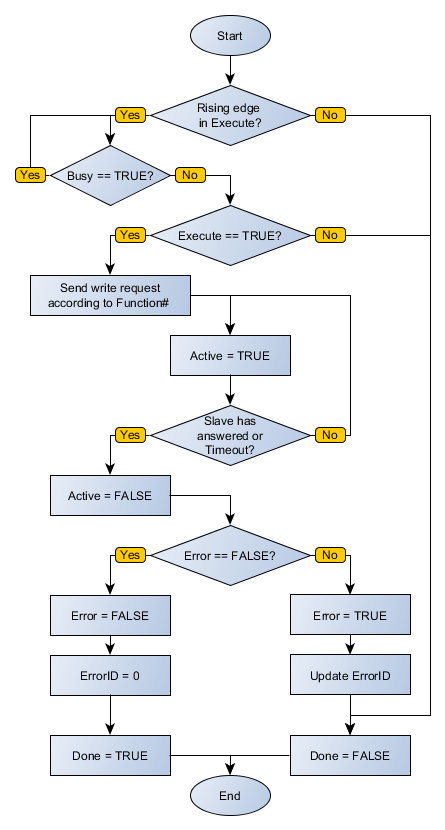
On a rising edge of Execute, the block checks whether the Modbus RTU slave at SlaveAddress is free for a request. If Busy is FALSE, it writes the values from Value to the bit range starting at InitialDataAddress, using NumberOfData and the function selected in Function#.
The block sets Active while it waits for the slave response and resets Active when the response is received. If the slave is busy, the block waits until Busy becomes FALSE before sending the request.
When Execute is FALSE, Done remains FALSE. Done is TRUE only after the block completes successfully and remains TRUE until Execute becomes FALSE.
If Execute becomes FALSE while Busy is still TRUE, the request is canceled.
Value must be an array with the same size as NumberOfData. Check this compatibility to avoid block errors.
Error Codes
| Code | Description |
|---|---|
| 0 | Executed successfully. |
| 1 | Invalid input data. |
| 2 | Master not enabled. |
| 4 | Response timeout from the slave. |
| 5 | Slave returned an error. |
Execution Flowchart
Examples
- Ladder
- Structured Text
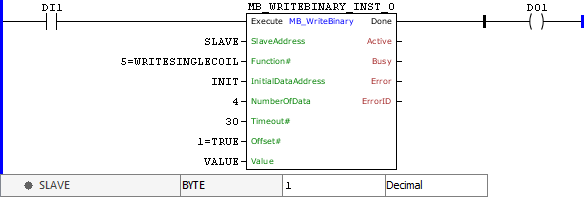
This example writes the data contained in VALUE, with size DATA_COUNT, starting at INIT on the Modbus RTU slave address SLAVE using the Write Single Coil function. When the block finishes successfully, Done is activated.
The following Structured Text code applies the same logic shown in the Ladder example.
VAR
    SLAVE : BYTE := 1;
    INIT : WORD;
    VALUE : ARRAY [0..4] OF BOOL;
    MB_WRITEBINARY_INST_0 : FB_MB_WriteBinary;
END_VAR

MB_WRITEBINARY_INST_0.Execute := DI1;
MB_WRITEBINARY_INST_0(
    SlaveAddress:=SLAVE,
    Function:=5,
    InitialDataAddress:=INIT,
    NumberOfData:=4,
    Timeout:=30,
    Offset:=1,
    Value:=VALUE);
DO1 := MB_WRITEBINARY_INST_0.Done;