|
Recipes |
  
|
|
Recipes |
|
A recipe is a data set organized in the memory which define certain configurations for a process, such as: time of each step, minimum and maximum values, setpoint, number of repetitions, etc.
In order to create a recipe table, first it is necessary to define the data that will compose it through a data structure. To create a data structure, see the content Structures.
Creating a recipe
| 1. | With the right button of the mouse on the folder Recipe, click on New file. |
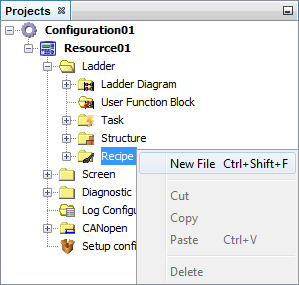
Figure 1: Creating a Recipe
| 2. | Define the file name and press the Next button. |
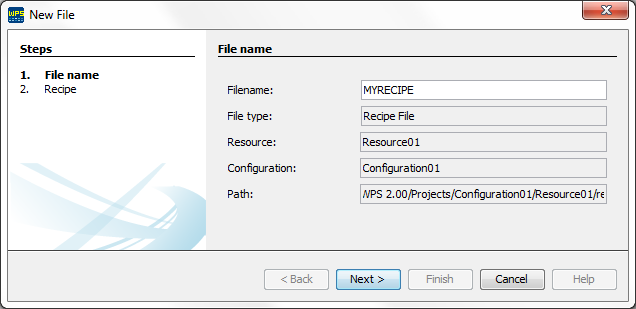
Figure 2: Defining the Recipe name
| 3. | Configure the recipe by configuring the fields as shown in the figure below. |
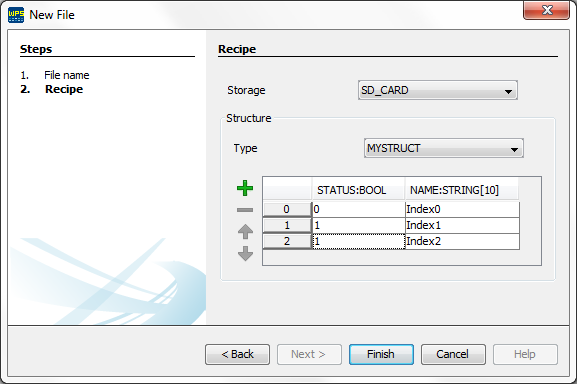
Figure 3: Editing the recipe
| • | Storage |
| o | RAM Memory: the recipe data are stored in the RAM memory, making its handling faster, but with storage capacity limited to the memory of the PLC300. |
| o | SD card: the recipe data are stored in files in the memory card, making its handling much slower, but with storage capacity according to the capacity of the SD card. |
| • | Type |
| o | It allows to select all the structures that were defined by the user in the project. |
| • | Data Table |
| o | The columns represent the structure elements. Note that besides the member name, the respective data type is also presented after the ‘:’; |
| o | The lines represent each recipe. |
| 4. | After finishing the edition of the structure, click on the Finish button. |
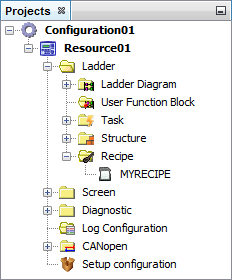
Figure 4: Recipe created in the Project
Editing a recipe
Just double click on the desired structure, as shown in figure 4, and a window will open, as shown in figure 3, allowing to insert new data, erase or move the position of the data.
Using Recipes
To use de recipe data, you must create a variable of the desired structure type:
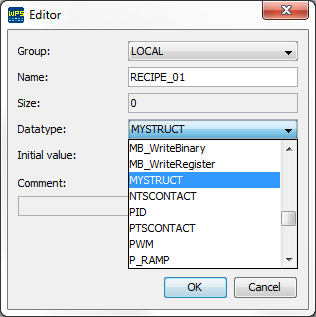
Figure 5: Setting the variable
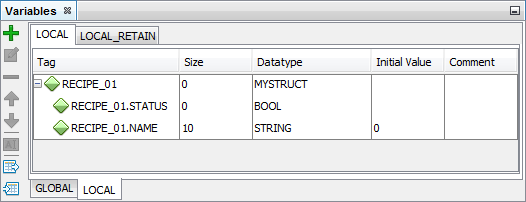
Figure 6: Table containing the variable
After creating the variable, the block ReadRecipe should be used to load the recipe data for the variable or WriteRecipe to record the data contained in the variable.

Figure 7: Block ReadRecipe configured