|
Overview |
  
|
|
Overview |
|
During the Ladder edition, it is necessary to define the variables used in the Ladder components. This definition can be done directly in the Ladder and/or in the editor/list of variables.
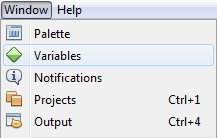
The table of variables must be activated through the menu Window > Variables as shown in the following figure.
In the variable edition window, the following commands are available:
 - Add a new variable
 - Edit the selected variable
 - Remove the selected variable
 - Move the selected variable one row up in the table
 - Move the selected variable one row down in the table
 - Rename the selected variable
 - Export variables from this group to a file
 - Import variables to this group from a file
The variables of the GLOBAL scope (1) present the groups (2) as shown in figure 1.
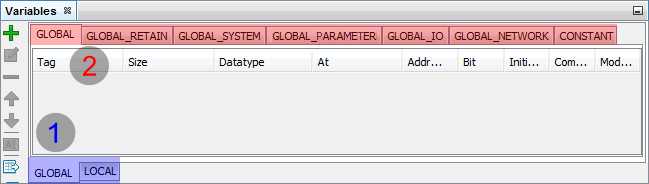
Figure 1: Variable Editor for the "GLOBAL" Scope
In this area of the global variables, the following groups are available:
| • | Constant: variables that store constant values |
| • | Global: variables accessible by all the Ladder files |
| • | Global Retentive: similar to the Global group, but with retentive memory |
| • | System Global: variables previously defined with system functions |
| • | Global Parameter: variables from device accessible by Ladder and HMI |
| • | I/O Global: physical inputs and outputs of the equipment |
| • | Network Global: Variables previously defined for network communication |
The variables of the LOCAL scope (1) present the groups (2) as per figure 2.
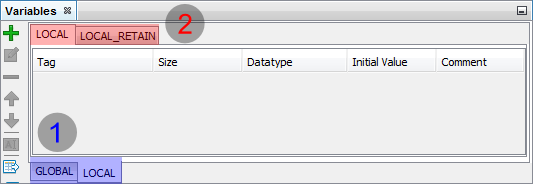
Figure 2: Variable Editor for the "LOCAL" Scope
In this area of local variables, the following groups are available:
| • | Location: variables only accessible through the Ladder that is being edited |
| • | Local Retentive: similar to the local group, but with retentive memory |
|
NOTE! A retentive memory keeps its value even with the equipment off. |
