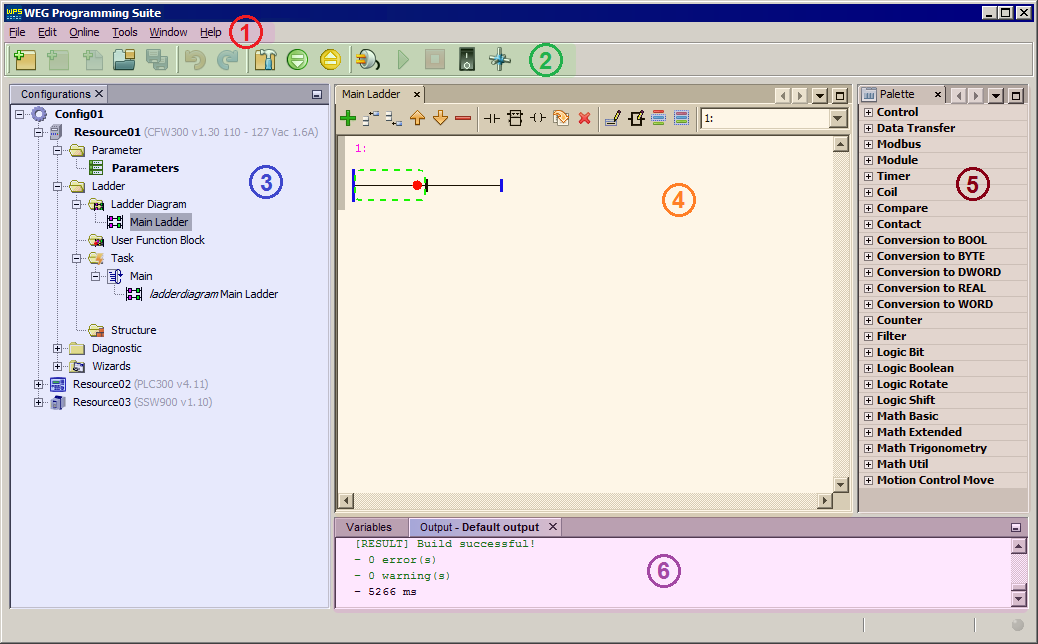
The main window of WPS v3.1X may be divided in 6 main parts:
| 1. | Menus: show the several options for editing, visualization, communication, and help in the development environment; |
| 2. | Toolbar: displays the main commands of the software; |
| 3. | Configurations Window: shows the tree including the open Configuration structure; |
| 4. | Editor Window: main part of the development environment where the edition of the components that will form the source file takes place; |
| 5. | Palette Window: includes the components to be inserted into the editor through drag'n drop; |
| 6. | Output Window: shows compilation and download messages. |