|
SIN |
  
|
|
SIN |
|
Block that calculates the sine of Angle, storing the result in Result.
Ladder Representation

Block Structure
Variable Type |
Name |
Data Type |
Description |
VAR_INPUT |
EN |
BOOL |
Block enabling |
Angle |
REAL LREAL |
Angle (in radians) |
|
VAR_OUTPUT |
Done |
BOOL |
End of operation |
Result |
REAL LREAL |
Variable that stores the result of the operation |
Operation
When this block has a TRUE value in EN, it sends to the Result output the sine of Angle. If no errors, the Done variable is set. If there is any error in the operation, Done is not set, staying in FALSE status, while Result remains with its value unchanged.
When EN has FALSE value, Result remains unchanged and Done remains in FALSE.
Block Flowchart

Example in Ladder
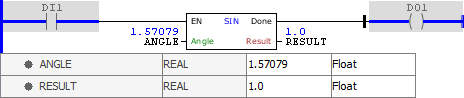
The above example calculates the sine of the ANGLE variable, interpreted in radians, storing the final result in RESULT. The block ends with success and Done output is activated.
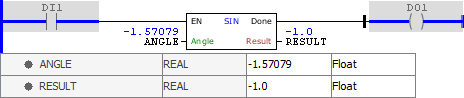
The above example calculates the sine of the ANGLE variable, interpreted in radians, storing the final result in RESULT. The block ends with success and Done output is activated. Notice that the block accepts negative input values.
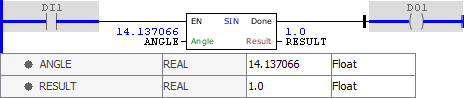
The above example calculates the sine of the ANGLE variable, interpreted in radians, storing the final result in RESULT. The block ends with success and Done output is activated. Notice that the block accepts values greater than one full turn.
Example in ST
The example below displays the instructions for applying the example above in the ST language.
VAR ANGLE : REAL := -14.137066; RESULT : REAL; END_VAR
RESULT := FB_SIN(EN:=DI1, Angle:=ANGLE, Done=>DO1);
|
|---|