|
STORE |
  
|
|
STORE |
|
Block that performs direct storage of data from a source to a destination.
Ladder Representation

Block Structure
Variable Type |
Name |
Data Type |
Description |
VAR_INPUT |
EN |
BOOL |
Block enabling |
SRC (*) |
BYTE USINT SINT WORD UINT INT DWORD DINT DINT REAL LREAL STRING |
Data source |
|
VAR_OUTPUT |
ENO |
BOOL |
End of operation |
DST (*) |
BYTE USINT SINT WORD UINT INT DWORD DINT DINT REAL LREAL STRING |
Data destination |
Operation
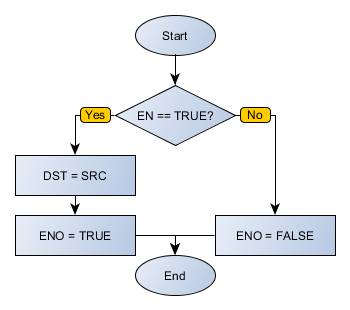
When this block has a TRUE value in EN, it stores the contents from SRC into DST.
|
NOTE! SRC and DST must have data types of the same size.
* The value set in SRC cannot have different size than the variable defined in DST, it will cause a compilation error. To prevent it, define a valid type before the value. Example: INT#25. |
When EN has FALSE value, DST remains unchanged.
The ENO value forwards to the next Ladder block the EN value after the operation is completed.
Block Flowchart
Example in Ladder
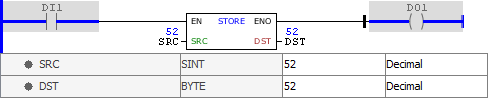
The example above stores the value of the variable SRC in DST. The block ends with success and ENO output is activated.
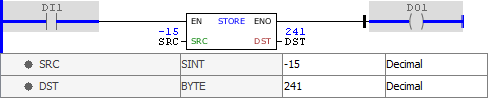
The example above stores the value of the variable SRC in DST. The block ends with success and ENO output is activated. Note that the binary pattern is maintained between variables of different types.
Example in ST
The example below displays the instructions for applying the example above in the ST language.
VAR SRC : SINT := 52; DST : BYTE; END_VAR
DST := FB_STORE(EN:=DI1, SRC:=SRC, ENO=>DO1);
|
|---|
