|
ISTORE |
  
|
|
ISTORE |
|
Block that indirectly loads the Value value in a variable.
Ladder Representation
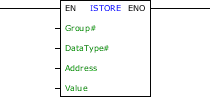
Block Structure
Variable Type |
Name |
Data Type |
Description |
VAR_INPUT |
EN |
BOOL |
Block enabling |
Group# |
BYTE |
Group where the variable is stored |
|
DataType# |
BYTE |
Data type of the selected variable |
|
Address |
DWORD UDINT DINT |
Address of the global variable, as its group |
|
Value |
Depending on the selection of the DataType# |
Value to be written in the selected variable |
|
VAR_OUTPUT |
ENO |
BOOL |
End of operation |
Operation
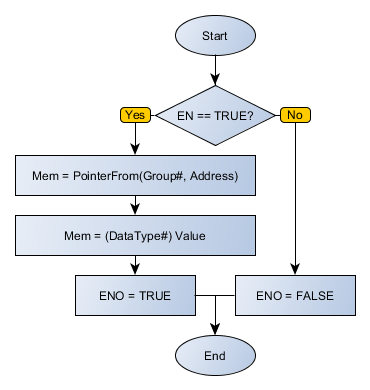
When this block has a TRUE value in EN, it loads the Value value in the contents of the Address variable belonging to the Group# group, as the selected DataType#.
When EN has FALSE value, Value remains unchanged.
The ENO value forwards to the next Ladder block the EN value after the operation is completed.
Block Flowchart
Example in Ladder
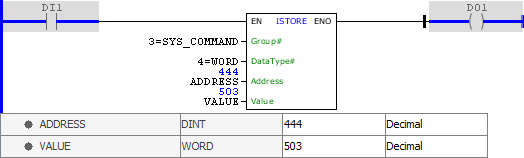
The example above stores the VALUE value in WORD format in address 444 of group 3 (GLOBAL_SYSTEM% C), which represents the index of the communication port Modbus TCP. The block ends with success and ENO output is activated.
Example in ST
The example below displays the instructions for applying the example above in the ST language.
VAR ADDRESS : DINT := 444; VALUE : WORD := 503; END_VAR
DO1 := FB_ISTORE( EN:=DI1, Group:=3, DataType:=4, Address:=ADDRESS, Value:=VALUE);
|
|---|