|
SCALE Data scale conversion |
  
|
|
SCALE Data scale conversion |
|
Block that converts a value from a scale to another one.
Ladder Representation
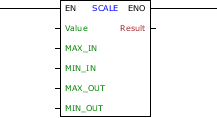
Block Structure
Variable Type |
Name |
Data type |
Description |
VAR_INPUT |
EN |
BOOL |
Block enabling |
Value |
BYTE USINT SINT WORD UINT INT DWORD UDINT DINT REAL |
Input value to be converted |
|
MAX_IN |
BYTE USINT SINT WORD UINT INT DWORD UDINT DINT REAL |
Maximum value of input scale |
|
MIN_IN |
BYTE USINT SINT WORD UINT INT DWORD UDINT DINT REAL |
Minimum value of input scale |
|
MAX_OUT |
BYTE USINT SINT WORD UINT INT DWORD UDINT DINT REAL |
Maximum value of output scale |
|
MIN_OUT |
BYTE USINT SINT WORD UINT INT DWORD UDINT DINT REAL |
Minimum value of output scale |
|
VAR_OUTPUT |
ENO |
BOOL |
End of operation |
Result |
BYTE USINT SINT WORD UINT INT DWORD UDINT DINT REAL |
Output value on new scale |
Operation
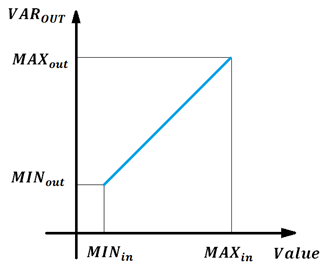
This block, when it has a TRUE value in EN, by setting the minimum and maximum values of the variable to be converted and the minimum and maximum values of the new scale variable, defined by the user, performs the Scale function for the conversion of the variable according to equation:

Where:

and

The graph below represents the straight linearized:
When EN has FALSE value, DST remains unchanged.
The ENO value forwards to the next Ladder block the EN value after the operation is completed.
|
NOTE! - The value in MAXin must be greater than value in MINin; - The value in MAXout must be greater than value in MINout; - Value in Value according to: MINin ≤ Value ≤ MAXin. |
Block Flowchart

Example in Ladder
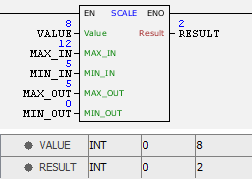
The example above stores the value of the variable VALUE in Result. The block considers the equation described above and ends with success and ENO output is activated.
Example in ST
The example below displays the instructions for applying the example above in the ST language.
VAR VALUE : INT := 8; MAX_IN : INT := 12; MIN_IN : INT := 5; MAX_OUT : INT := 5; MIN_OUT : INT := 0; RESULT : INT; END_VAR
RESULT := FB_SCALE( EN:=DI1, Value:=VALUE, MAX_IN:=MAX_IN, MIN_IN:=MIN_IN, MAX_OUT:=MAX_OUT, MIN_OUT:=MIN_OUT, ENO=>DO1);
|
|---|
