|
CO_SlaveStatus CANopen Slave Status |
  
|
|
CO_SlaveStatus CANopen Slave Status |
|
Block that allows monitoring various statuses of the CANopen network master.
Ladder Representation
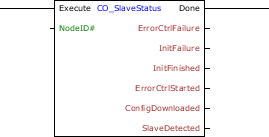
Block Structure
Variable Type |
Name |
Data Type |
Description |
VAR_INPUT |
Execute |
BOOL |
Block enabling |
NodeID |
BYTE USINT |
Slave address for monitoring |
|
VAR_OUTPUT |
Done |
BOOL |
Output enabling |
ErrorCtrlFailure |
BOOL |
Flag indicating error of nodeguarding or heartbeat in a slave network |
|
InitFailure |
BOOL |
Flag indicating error in the initialization of the slavee network |
|
InitFinished |
BOOL |
Flag indicating the initialization of the slaves was completed |
|
ErrorCtrlStarted |
BOOL |
Flag of start of the error control service |
|
ConfigDownloaded |
BOOL |
Flag of success in the download of SDO settings in the slave |
|
SlaveDetected |
BOOL |
Flag of success in reading slave ID via SDO |
Operation
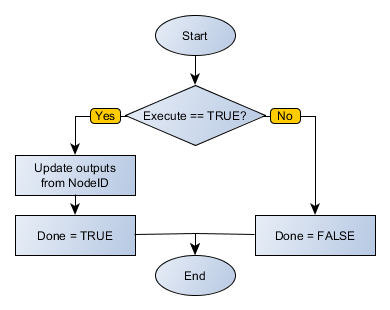
This block remains active while Execute is at TRUE level, updating its outputs according to the monitoring of the slave. When Execute receives FALSE level, the inputs are ignored and the outputs are zeroed. The Done output receives TRUE level when Execute has TRUE level and block finished its execution.
Outputs receive TRUE level when the status of the CANopen slave indicated by address NodeID matches description (boot error, download success, etc.).
Block Flowchart
Example in Ladder
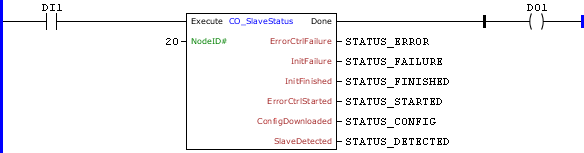
The example above requests data from the slave 20 of the CANopen network. The block ends successfully, Done output is activated.
Example in ST
The example below displays the instructions for applying the example above in the ST language.
VAR STATUS_ERROR, STATUS_FAILURE, STATUS_FINISHED, STATUS_STARTED, STATUS_CONFIG, STATUS_DETECTED : BOOL; END_VAR
DO1 := FB_CO_SlaveStatus( Execute:=DI1, NodeID:=20, ErrorCtrlFailure=>STATUS_ERROR, InitFailure=>STATUS_FAILURE, InitFinished=>STATUS_FINISHED, ErrorCtrlStarted=>STATUS_STARTED, ConfigDownloaded=>STATUS_CONFIG, SlaveDetected=>STATUS_DETECTED);
|
|---|