|
STR_CONCAT Concatenação de Strings |
  
|
|
STR_CONCAT Concatenação de Strings |
|
Block that performs concatenation of STR1 and STR2, storing the result in DST.
Ladder Representation

Block Structure
Variable Type |
Name |
Data Type |
Description |
VAR_INPUT |
EN |
BOOL |
Block enabling |
STR1 |
STRING |
First STRING |
|
STR2 |
STRING |
Second STRING |
|
VAR_OUTPUT |
DONE |
BOOL |
Output enabling |
DST |
BYTE |
Variable that receives the new STRING formed from the junction of STR1 and STR2 |
Operation
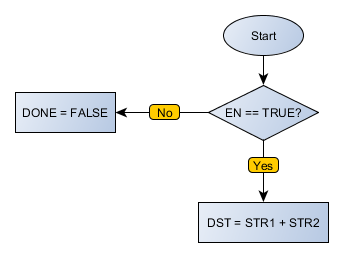
This block remains active as long as EN is at TRUE level, updating the value of DST according to the input STRINGs. DST receives STR1 value concatenated with STR2 value at its end.
The DONE value forwards to the next Ladder block the EN value when the operation is completed.
|
NOTE! If the size of DST is less than the sum of the number of characters STR1 and STR2, the resulting value will be truncated. |
Compatibility
Device |
Version |
PLC300 |
2.10 or higher |
Block Flowchart
Example in Ladder

In the above example, STR1 and STR2 are concatenated, and the result is sent to DST_10. When the block is ended successfully, the DONE output is activated.

In the above example, STR1 and STR2 are concatenated, and the result is sent to DST_6. Since the size of DST_6 is 6, the last two characters of the concatenation are discarded. The block ends successfully, Done output is activated.
Example in ST
The example below displays the instructions for applying the example above in the ST language.
VAR STR1 : STRING := 'abcd'; STR2 : STRING := '1234'; DST_6 : STRING; END_VAR
DST_6 := FB_STR_CONCAT( EN:=DI1, STR1:=STR1, STR2:=STR2, Done=>DO1);
|
|---|
